Microsoft adds Copilot to the Windows 11 context menu, but you can disable it
Microsoft is finding new ways to promote its AI assistant, Copilot. A new update to the Copilot app for Windows has added a shortcut in the right-click context menu.
Users will now find an option labeled 'Ask Copilot' when they right-click on a file, which has been designed to make it easier to access the AI's features.
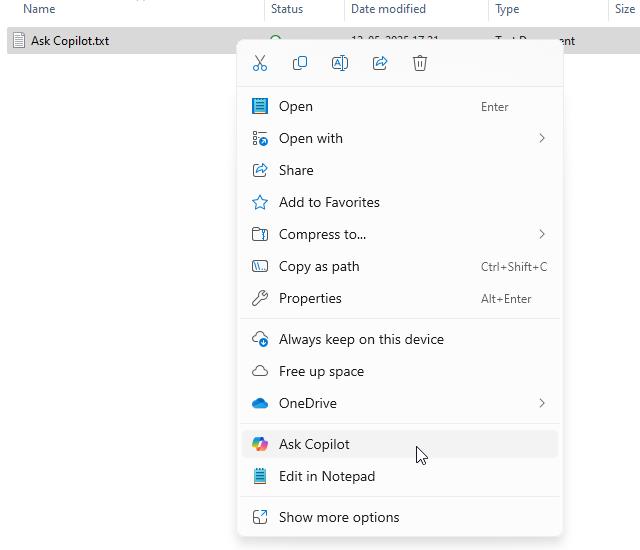
However, the integration of this new feature has sparked a backlash from many Windows 11 users. The context menu, once a streamlined hub of shortcuts for regular actions, is progressively becoming cluttered with entries that some find unnecessary. The 'Ask Copilot' option is viewed by users as "yet another Copilot option that nobody asked for".
Even more frustratingly, there is no direct way to disable this "Ask Copilot" shortcut, but there are a couple of workarounds. Users who don't wish to use Copilot at all can simply uninstall the app. Users who may want to use Copilot, but don't need the shortcut, will need to edit an entry in the Windows Registry to remove it from File Explorer.
The instructions spotted on ElevenForum by Neowin explains how to do this.
1. Save the following content as a text file using Notepad.
Windows Registry Editor Version 5.00
[HKEY_CURRENT_USER\Software\Microsoft\Windows\CurrentVersion\Shell Extensions\Blocked]
"{CB3B0003-8088-4EDE-8769-8B354AB2FF8C}"=-
2. Change the file's extension from .txt to .reg. For example, if you named it Copilot.txt, rename it to Copilot.reg.
3. Then, double-click on the reg file, and confirm the action. This will remove the Ask Copilot shortcut from the context menu, but you will need to restart the computer to apply the changes.
Microsoft recently added an AI Agent to the Settings app. Recall is now available for Copilot+ PCs, clearly there are more AI features that are coming to Windows 11, regardless of whether users like them or not.
RECOMMENDED NEWS

Firefox 140 ships with Unload Tab feature and new ESR base
Mozilla plans to release Firefox 140.0 to the Stable channel on June 24th, 2025. The new version of...

Huawei enters the satellite internet arena
The race to provide global internet access has taken a significant leap forward with Huawei's recen...

Windows 11 24H2 and Windows 12 expected in 2024
Will Microsoft release Windows 12 in 2024 and what would the release mean for Windows 11? Microsoft...

Google settles its $5 billion privacy lawsuit over Incognito Mode tracking
A class-action lawsuit against Google Chrome's Incognito mode tracking was filed in June 2020. The ...

Popular AI App DeepSeek Sends Unencrypted Data to ByteDance Servers
Recent security analyses have revealed that the iOS version of DeepSeek, a widely-used AI chatbot d...
OneNote for Windows 10 to be discontinued by 2025
Microsoft has officially announced plans to discontinue support for OneNote for Windows 10, the Uni...
Comments on "Microsoft adds Copilot to the Windows 11 context menu, but you can disable it" :