Microsoft Edge: AI is taking over the New Tab Page
"How can I help you today". That is what you see when you open Microsoft Edge's new tab page in the latest development version. Microsoft is replacing the traditional new tab page with a page that is all about Copilot. It is the second Copilot feature that has been added to Edge recently by Microsoft.
Currently, that is only an experiment, but there is a chance that this new AI-powered page is replacing the classic new tab page, at least as an option.
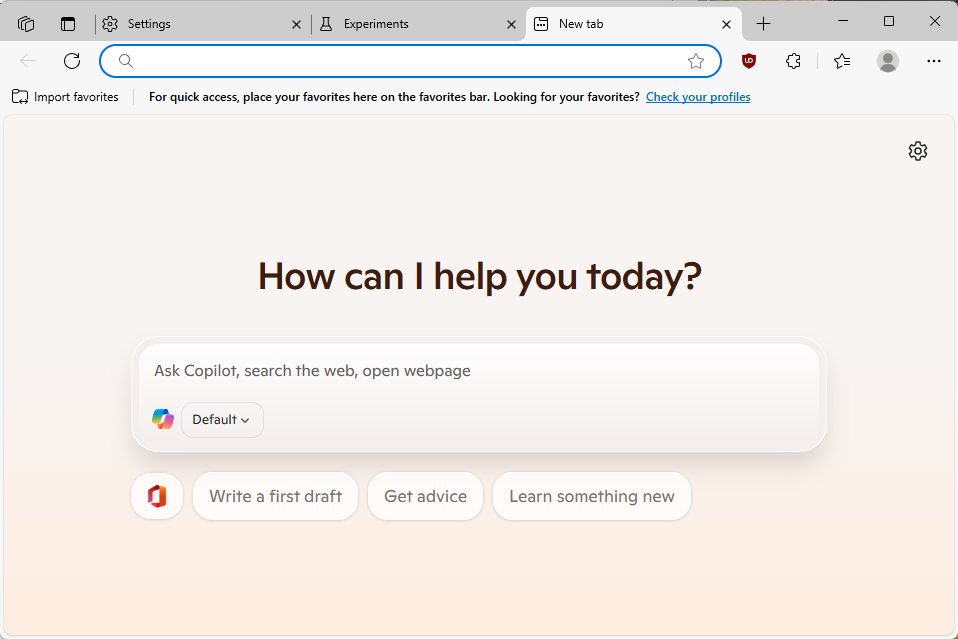
The test page displays the Copilot chat interface in the central location. You also get top sites as icons displayed underneath the interface, but that is all there is to see right now.
The default mode of Copilot combines options to chat with the AI with web-based activity, such as searching and navigating. So, if you used to type the name of a site to open it previously, this continues to work on the experimental page.
Just type the domain name, e.g., ghacks.net, and press the Enter-key to do so. Edge will load the domain and display it immediately.
Many of the interactions with Copilot redirect you to the Bing website where the results are shown. Pretty much anything that I typed was redirected to Bing. Any request to interact with the open tabs was ignored. It is possible that this is still in development and that interactions with tabs come at a later point in time.
Opera is ahead in this regard, as you can interact with the integrated AI Aria to some degree already.
How to enable or disable the new Copilot-powered New Tab Page in Edge
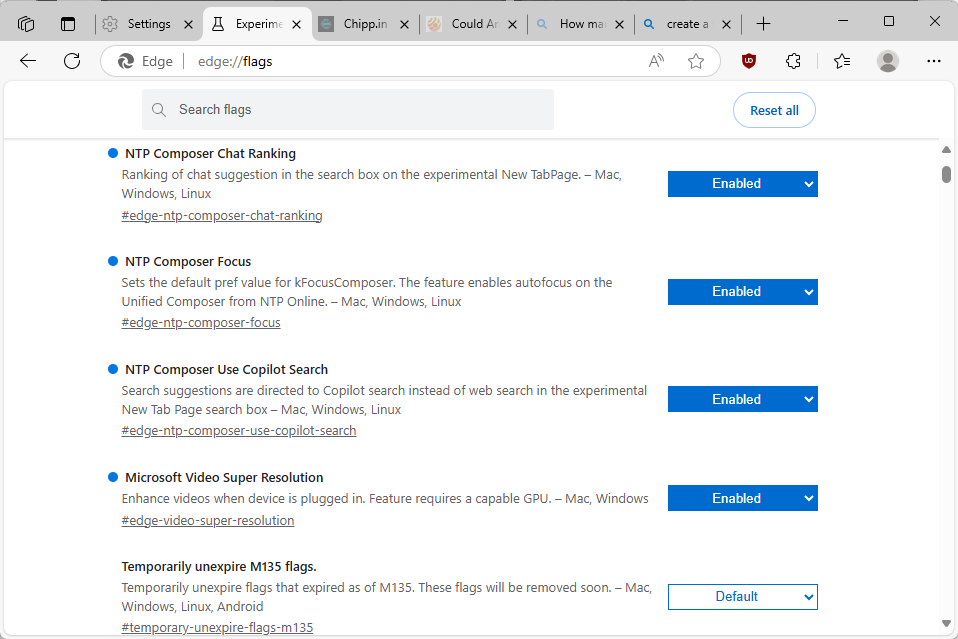
If you run Microsoft Edge 137 or later, you may configure Copilot on the new tab page in the following way:
- Load edge://flags/#edge-ntp-composer and set the status to "Enabled with experimental features"
- Load edge://flags/#edge-ntp-composer-chat-ranking and set to "Enabled".
- Load edge://flags/#edge-ntp-composer-focus and set to "Enabled.
- Load edge://flags/#edge-ntp-composer-use-copilot-search and set to "Enabled.
- Restart Microsoft Edge.
This enables Copilot on the new tab page. To disable it, set the flags either to "Default" or "Disabled". The default value may switch at some time, which means that disabled is your best bet if you do not want to use Copilot on the new tab page.
Closing Words
It remains to be seen how useful AI is going to be on the new tab page or integration in the browser. For now, the integration is rather simple and more an exact copy of what you get when you interact with AI chat tools directly.
In the future, it is likely that AI will be integrated deeper into the browser so that you can use natural language to have it execute actions for you. Opera Software has integrated some of these already in its browser, but others will likely follow.
Now You: What is your take on this? Can you see yourself using AI on the new tab page or the browser in general? Feel free to leave a comment down below. (via Deskmodder)
RECOMMENDED NEWS
Chrome shows how much memory a tab uses
Google is testing a new feature in its Chrome web browser that reports the memory usage of each bro...

Apple introduces new rule to allow users to download apps from developers websites in the EU
Apple released iOS 17.4 last week to comply with the European Union's Digital Markets Act, to add s...

Windows 11 Government Edition is what everyone wants, but there is a catch
A new edition of Windows 11 has been making the rounds over the weekend. Called Windows 11 Governme...

Thunderbird 128 Nebula: almost there, four channels and ESR
The Thunderbird team continues its work on the next big version of the open source email client. Th...

Prime Gaming Offers BioShock Infinite: Complete Edition and 19 More Free Games This February
Amazon's Prime Gaming is treating members to a substantial lineup of free games this February, feat...
HP Refrains from Developing OMEN Gaming Handheld Due to Windows Limitations
In the rapidly evolving handheld gaming market, HP's absence has been notable, especially as compet...
Comments on "Microsoft Edge: AI is taking over the New Tab Page" :