Microsoft PowerToys: reimagined Run tool CmdPal is the "one-stop launcher to start anything"
Microsoft is working on a new program called Command Palette for its open source PowerToys collection that will replace the Run module in the near future.
PowerToys Run is a quick launcher for Windows that is invoked with the shortcut Alt-Space. You may use it to run programs quickly and for other tasks, including web searches, Shell commands, or finding files.
Command Palette will expand the functionality. In fact, plans are to "eventually graduate [the module] out of PowerToys" to turn it into a standalone application.
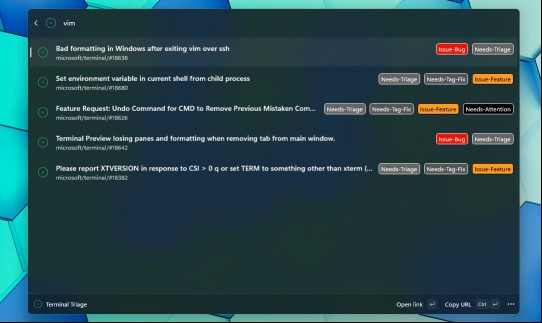
It should then work like other dedicated launchers for Windows, including Launchy, PinPoint, or Flow Launcher.
As far as differences to PowerToys Run are concerned, there are some. Not all modules that Run uses have been ported at this stage. Most, including the option to run installed apps, search for files, or run web searches, are already integrated.
The biggest change is the introduction of new extensions that expand the functionality. One of the major additions is support for winget, the Windows package manager. This allows you to install, uninstall, or update extensions directly from the Command Palette interface.
Winget commands can be very useful. There is a command to upgrade all installed programs or to install Microsoft Store apps without using the Store.
Another new feature of the redesigned launcher is the option to save bookmarks. The developer notes say that you may use them to save shortcuts to files, folders, and webpages as top-level commands. Whether that includes bookmarking commands remains to be seen, as this is not mentioned specifically.
Closing Words
The new application is not yet available. It remains to be seen how snappy it is going to be in comparison to existing launchers, especially once it is available as a standalone application and not as an integrated module of the PowerToys collection of Windows tools.
The development progress is highlighted on GitHub. Just follow this link and you see the exact state of the new run module and launcher for PowerToys.
Now You: do you use a launcher application on your systems? If so, which and why?
RECOMMENDED NEWS
Canonical: up to 12 years of support for Ubuntu 24.04 LTS
Ubuntu 24.04 LTS is expected in April 2024. The new long-term service support release of the popula...
Microsoft Copilot app getting installed on Windows devices
Last week, Microsoft revealed that it started to push its AI Microsoft Copilot to more Windows 10 a...

Mozilla released a Firefox Nightly test build with vertical tabs
Mozilla released a Firefox Nightly test build recently that includes support for vertical tabs. Thi...

DeepSeek's Claimed $6 Million AI Model Training Under Scrutiny Amid Reports of $1.6 Billion Investment
Recent reports have cast doubt on DeepSeek's assertion that it trained its R1 AI model for just $6 ...
Microsoft suggests to trade your PC or recycle it in "end of support for Windows 10" emails
Microsoft is sending out emails to customers who still run the Windows 10 operating system to infor...
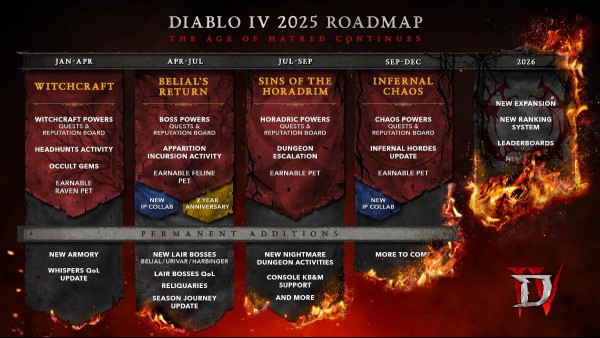
Diablo 4 roadmap confirms keyboard and mouse support for consoles
Diablo 4 players on Xbox and PlayStation have long expressed frustration over the cumbersome invent...
Comments on "Microsoft PowerToys: reimagined Run tool CmdPal is the "one-stop launcher to start anything"" :