Copilot App on Windows set to autostart on System log in
Microsoft has released so many Copilot-Apps and services in the past that it is difficult to keep track of them all. Last year, the company announced that it would split Copilot from Windows by changing it into an app.
This approach removed the one and only reason for many Windows users to give Copilot a preference over the myriads of other AI-tools and services: the ability to control Windows features. Granted, the Windows-specific functionality was not impressive, but it had the potential of becoming a useful feature. Imagine running into a problem, telling Copilot about it, and the AI solving the problem on its own.
The new Copilot app works like the web-version of the AI service, which means there is little incentive to favor it over the web service. In fact, there are good reasons not to use the app and run AI services in a browser. Content blocking is just one which comes to mind.
Copilot autostarting with Windows
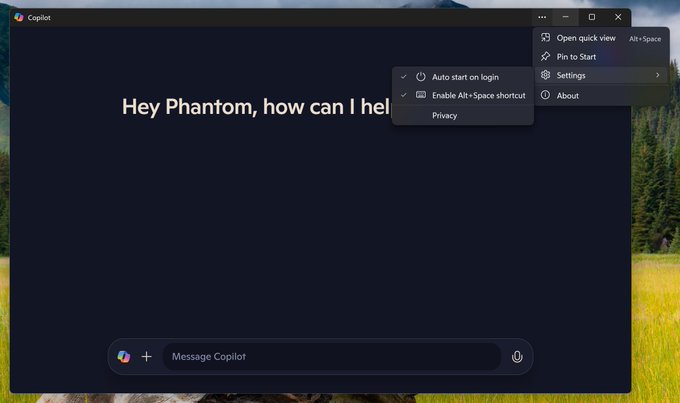
Eagle-eyed Windows detective Phantom of Earth discovered that the latest Copilot App test version for Insiders contains autostart functionality. It is version 1.25014.121.0.
You may remember that Microsoft made the same move in the old Copilot for Windows. It was also set to open when Windows starts automatically, at least on some devices.
Naturally, this means that the app is set to autostart. In other words, Microsoft wants the app to run on launch and therefore in the background. There is a good chance that this want runs opposite to what many Windows users want.
Windows users who do not want that can disable the autostart functionality in the following way:
- Launch the Copilot application.
- Select Settings
- Click on "Auto start on login" and make sure the checkmark is removed.
This takes care of the autostarting behavior. Note that you may also use other means, Autoruns for example, to tame the Copilot app and any other software that is misbehaving in this way.
The Task Manager functionality is severely limited, and therefore not a good option to control startup items on Windows PCs.
Closing Words
It is a good idea to check startup items on Windows devices regularly, as there is always the chance that a developer enables the autostart of an app automatically. There is a chance, slim as it may be, that Microsoft won't set the next stable version of the Copilot app to autostart with the operating system.
Do you use AI tools like Copilot? Let us know in the comment section below.
RECOMMENDED NEWS

Apple Wallet ad to promote a movie makes users angry
Apple Wallet users are angry after the app displayed an ad for "F1 The Movie". Et tu, Apple? Yo...

Seeing Ads on YouTube? Google is testing server-side ads that break adblockers
If you run an adblocker in your browser of choice and still see ads on YouTube, then you have been ...

Kaspersky users in the US say their antivirus was replaced by UltraAV
Kaspersky users in the US have discovered that their antivirus has been replaced by UltraAV. That d...

Firefox: Mozilla confirms support for classic extensions and Manifest V3 add-ons
While Google is ending support for classic extensions for more users of its Chrome web browser, sev...

Microsoft Teams Introduces Live Chat to Boost Small Business Customer Engagement
Microsoft has introduced a new live chat feature within Microsoft Teams, aiming to enhance customer...

WWDC25 to feature online sessions and in-person events at Apple Park
Apple has announced that its annual Worldwide Developers Conference (WWDC) will take place from Jun...
Comments on "Copilot App on Windows set to autostart on System log in" :