Microsoft changes account sign-in system to keep users logged in automatically
Microsoft is implementing a significant change to its account authentication system starting February 2025. Under the new system, users stay signed in across sessions unless they sign out explicitly.
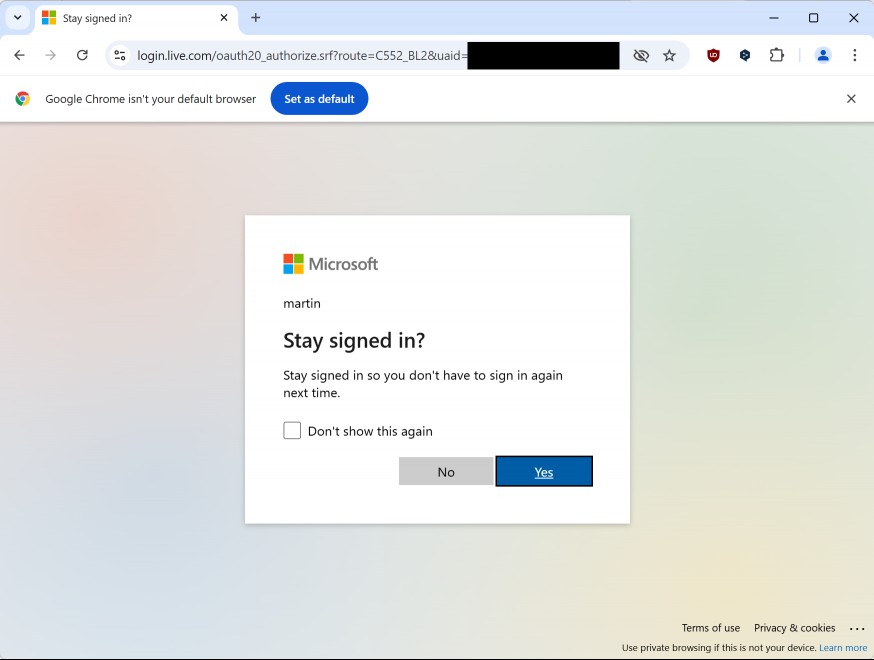
To better understand the change, it is necessary to look at how sign ins are handled currently by Microsoft. When you sign in to a Microsoft account in a web browser, a "stay signed in" prompt is displayed after you provide username, password, and the optional two-factor authentication verification.
Tip: check out our review of the best authenticator apps for Android and iOS.
When you decline, you stay signed in for the session only. When you accept it, you stay signed in even across sessions. This prompt is going away starting in February.
Here are the details:
- The change affects all Microsoft services, including Outlook, OneDrive, Microsoft 365, and other services and products that support login.
- A new global sign out option is available.
Security implications
While the change may look minor on first glance, it may have serious consequences on shared or public computer systems.
Here, it is necessary to sign out explicitly, as the next user may access the Microsoft account and linked services otherwise.
One way around this is to use a browser's private browsing mode on shared or public computer systems. Sign ins and any other activity is only kept for the browsing session. Once you close the browser, all data, including Microsoft account data, is no longer available.
Microsoft even suggests to use private browsing on devices that you do not own on the sign in page.
Best option remains to avoid signing in to any service on computers or devices that you do not have full control over.
The Global sign out option
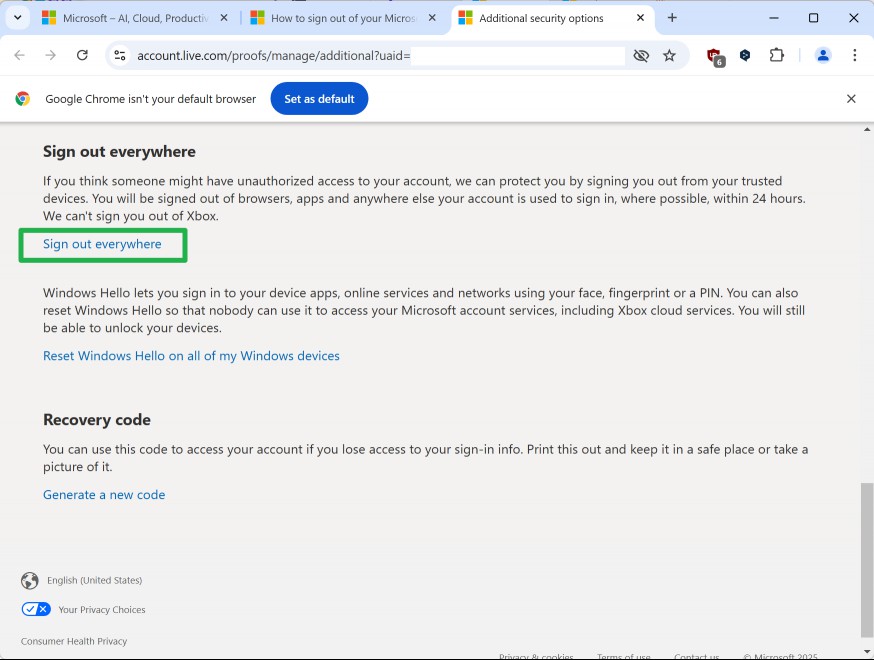
Microsoft customers who forget to sign out on systems that others have access to may trigger a global sign out to force a sign out on all systems.
Here is how that works:
- Open this Microsoft support page.
- Select the "sign in" button on the page. A new page opens that asks you to sign in, if you have not already.
- Scroll down on the additional security options webpage until you get to the sign out everywhere section.
- Activate the sign out everywhere link.
- Confirm the prompt by selecting "sign out".
Microsoft notes that this may take up to 24 hours. In other words, there is a 24 hour window in which others may still access Microsoft account related services on other devices.
Closing Words
The change impacts mostly Microsoft customers who sign in to their accounts on public or shared devices. Others may also be impacted, but to a lesser degree.
What is your take on the change? How do you handle sign ins on the Web? Feel free to leave a comment down below.
RECOMMENDED NEWS
Microsoft Edge is testing "Copilot Discover"; an MSN feed with AI-curated ads
Microsoft Edge began experimenting with a redesigned new tab page in April, to put Copilot front an...

Meta rolls out end-to-end encryption in Messenger
This week, Facebook and Instagram parent company Meta announced the rollout of end-to-end encryptio...

Firefox 121: Mozilla ends 2023 with a bang
Firefox 121 is the last major release of the Firefox web browser of 2023. The new release introduce...

Thunderbird 128 Upgrades are now enabled
Users of the Thunderbird email client who still use Thunderbird 115.x will be upgraded to the new v...

Apple releases iOS 18.1, macOS 15.1 and iPadOS 18.1 with Apple Intelligence
Apple has released iOS 18.1, macOS 15.1 and iPadOS 18.1 updates just a month after the release of i...

Instagram introduces fast-forward feature for Reels to compete with TikTok
Meta has announced an exciting new feature for Instagram users aimed at enhancing the Reels experie...
Comments on "Microsoft changes account sign-in system to keep users logged in automatically" :