Google Chrome: how to disable toast popups in the browser
If you have upgraded Google Chrome to the latest version already, you may have noticed a new type of popup that the browser uses.
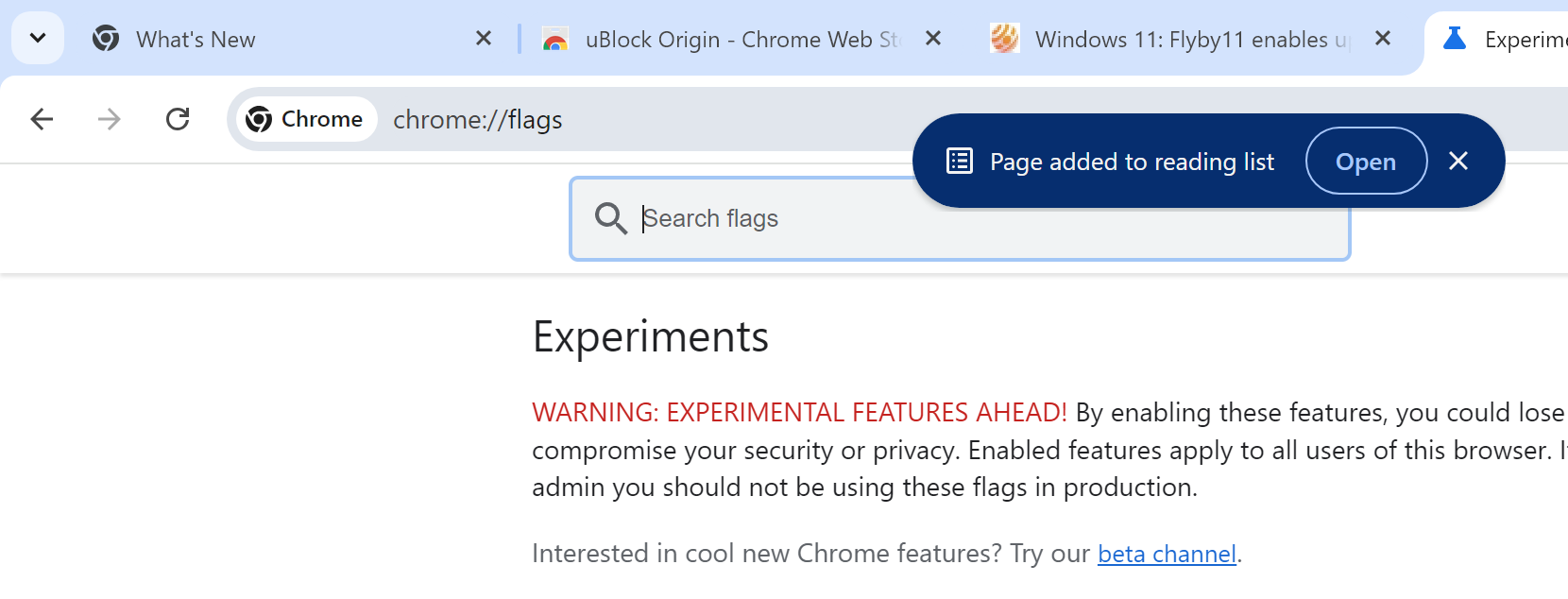
This toast popup appears centered at the top underneath the tabs. It confirms actions to you and may also provide you with follow-up options.
Here are a few examples:
- Chrome displays "link copied" as a popup when you right-click on a link and select the copy link option.
- When you right-click on a tab and select "add page to reading list", Chrome displays the "page added to reading list" toast popup. This one includes an option to open the page in the reading list.
Here are screenshots of how this looks like

Google says that new toast popups will be introduced at a later point by different teams.
The feature is rolling out currently. There is a chance that it is not activated in your version of Chrome at the time of writing. It may take weeks or even months before it reaches all desktop Chrome users.
Did you know?
Google Chrome: removal of uBlock Origin and other unsupported extensions has started
Disable the new Chrome Toast popups
Google has not added an option to the Chrome settings to turn off the feature. This may happen in the future, but Google has not commented on this yet.
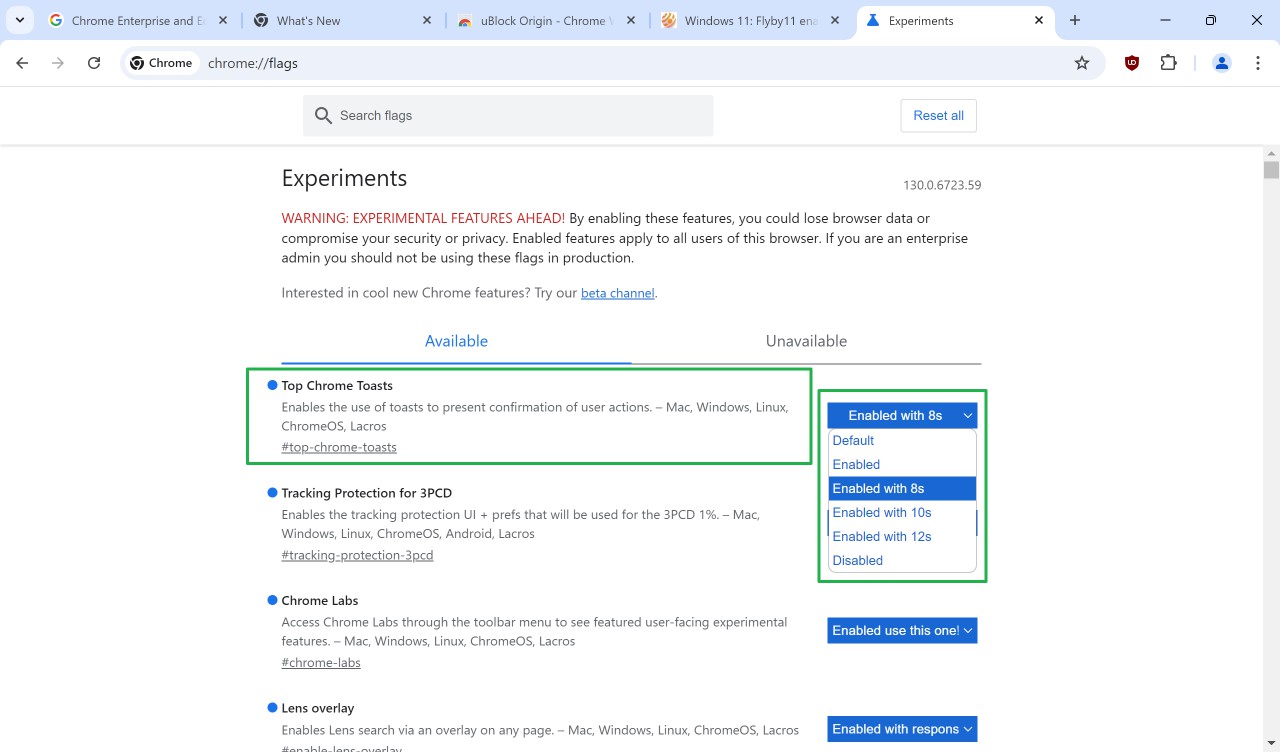
For now, it is possible to turn the feature on or off using an experimental flag.
Here is how that is done:
- Load chrome://flags/#top-chrome-toasts in the Chrome address bar.
- Change the status of Top Chrome Toasts from Default to one of the following options:
- Enabled -- enables the feature (this may not work for everyone)
- Enabled with 8s, 10s, 12s -- enables the feature and sets the toast period to 8, 10 or 12 seconds.
- Disabled -- this turns the Toast feature off.
- Restart Google Chrome.
To disable the Toast popups, set the value of the flag to Disabled. This turns it off.
Note: Google may remove experimental features without prior notice at any time. The option to disable the Toast notifications may be removed in a future version of the browser.
For now, you can use it to disable Top Chrome Toasts, if you do not need the visible confirmation of certain actions.
Tip: the toasts go away when you switch to another tab. Should Google remove the option to disable the toast notifications without adding the option to the settings, you may use this to make them go away whenever they appear.
Now You: what is your take on the feature? Useful confirmation for some actions? Or something that you have no use for and maybe find distracting? Feel free to leave a comment down below.
RECOMMENDED NEWS
Microsoft confirms Microsoft 365 service degradation for 1% of Chrome users
Google enabled Tracking Protection for 1% of all Chrome Stable users as part of the company's great...
Proton Mail says that the new Outlook app for Windows is Microsoft's new data collection service
Proton has accused Microsoft's new Outlook for Windows app for becoming a data collection service. ...
Time to patch: Chrome 120 fixes a 0-day security issue
Google released an update for its Chrome web browser a moment ago that fixes four security issues i...
Intel: Microsoft AI PCs need a Copilot Key
Microsoft hopes that 2024 will be the year that so-called AI PCs will take off. Tidbits and rumors ...
Microsoft launches Edge 130 with lots of security patches and feature changes
Microsoft released Edge 130 Stable today. The new release fixes plenty of security issues, but it a...
Android 16 Beta 1 is out: here is what is new or changing
Google released the first beta version of this year's Android release, Android 16, today. With Andr...
Comments on "Google Chrome: how to disable toast popups in the browser" :