Windows 11: Flyby11 enables upgrades on unsupported devices
Flyby11 is an open source script for Windows 11 that helps administrators upgrade a device to the latest release version, even if the computer does not meet all system requirements.
Microsoft released Windows 11 24H2 earlier this month. The new version brought more AI functionality and some other features, including Sudo for Windows or support for Wi-Fi 7.
The new version of Windows 11 is special, as it is the first version that blocks certain devices from performing an upgrade. While Microsoft did block direct installs or upgrades on unsupported devices since the very beginning, the release is the first that blocks very old devices from using bypasses to install the system.
Good to know: this particular change affects devices without SSE4.2 support. All modern processors of the last decade support these instructions. Still, earlier versions of Windows 11 can be installed on these devices.
All other unsupported devices can still be upgraded. Microsoft did make a few changes to the process as well.
You can check out my guide on upgrading to Windows 11 24H2 on unsupported hardware, or check out the latest version of Rufus for that.
Flyby11: open source tool to upgrade to Windows 11 on unsupported hardware
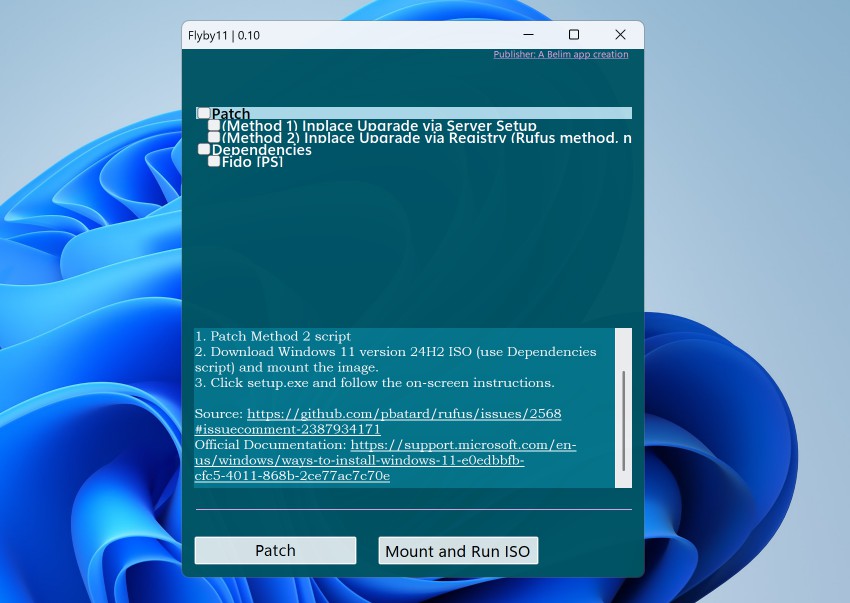
Flyby11 is designed to remove restrictions that prevent the upgrade to Windows 11 24H2 on unsupported devices.
It cannot be used for new installs, but if you want to upgrade, it is one of the tools that you may use.
The app offers all "working methods to bypass the restrictions for installing Windows 11 24H2 on unsupported hardware" according to the developer.
About the developer: Belim has created several open source tools in the past, including ThisIsWin11, Winpilot, or xd-AntiSpy.
Flyby11 supports two methods:
- The upgrade via Server setup.
- The upgrade via Registry modifications.
Here is how you use the app:
- Download the latest version of the application from the project's GitHub website.
- Extract the contents to the local system with a right-click and selecting "extract all > extract"
- Run the app.
- If you get "Windows protected your PC", select More Info > Run anyway.
- Confirm the security prompt with a click on the yes button.
Select the first or second method. You may want to start with the first. Check the Fido script option, which is required to download the latest Windows 11 24H2 ISO from Microsoft.
Once downloaded, select the mount and run ISO option.
Follow the instructions until the upgrade is completed. If this method does not work, try the second method instead. The only difference is that you need to check the second method this time.
Note: It is a bit difficult to keep the descriptions for each method and item displayed on the screen, as it changes on hover. Just check one option and when you move the mouse cursor, make sure you do not touch any of the other options. This should keep the description and give you the option to use the scrollbar as well.
Closing Words
Flyby11 offers an easy option to apply workarounds to upgrade an existing Windows 11 device with unsupported hardware to the latest release. The main benefit is that you do not need to run commands manually or execute a batch file.
It furthermore automates the download of the Windows 11 ISO image. Experienced users may not need it, but inexperienced users may use it to upgrade in fewer manual steps.
The app does not support new installs on unsupported hardware.
Is your device compatible with the latest version of Windows 11? If not, did you use a workaround to install the newest version? Feel free to leave a comment down below.
RECOMMENDED NEWS

Scam or not? BitDefender's Scamio AI promises to have the answer
Scamio is a new AI tool that promises to help Internet users combat scams. Spam and scams are commo...

Firefox 121: Mozilla ends 2023 with a bang
Firefox 121 is the last major release of the Firefox web browser of 2023. The new release introduce...

Nokia 2660 Flip review: retro phone that is surprisingly versatile
Nokia 2660 Flip is a new Nokia phone that has made digital detox its mission. While that is one rea...

iOS 17.3 Beta 2 is reportedly causing some iPhones to boot loop
Apple released the iOS 17.3 beta 2 to testers last night, but it was buggy. The update caused some ...

Firefox 136 launches with vertical tabs, but one requested feature is still missing
Mozilla published a new version of its open source browser Firefox today. Firefox 136 is a big upda...

Google is ending support for country-code Google domains like google.fr or google.co.uk
Traditionally, Google has maintained a large number of country-code domains such as google.de or go...
Comments on "Windows 11: Flyby11 enables upgrades on unsupported devices" :