Windows 11 set up is automatically enabling OneDrive folder back up for users
Microsoft has made yet another silent change to the way the initial setup of Windows 11 works. The operating system is enabling the automatic folder backup to OneDrive, without informing the user about it.
When you set up Windows 11, you will come across a screen that is captioned "unlock your Microsoft experience", it lists the benefits of using a Microsoft account. You can't skip this sign-in process, as Microsoft has made it difficult for users to install Windows 11 with a local account, so you will need to sign in to a Microsoft account to set up your PC.
Once Windows 11 is installed, you will likely see a notification pop-up in the Action Center that reminds you to back up your PC. This is related to OneDrive, which you can set up to back up your data.
OneDrive will back up your folders automatically on new installations of Windows 11
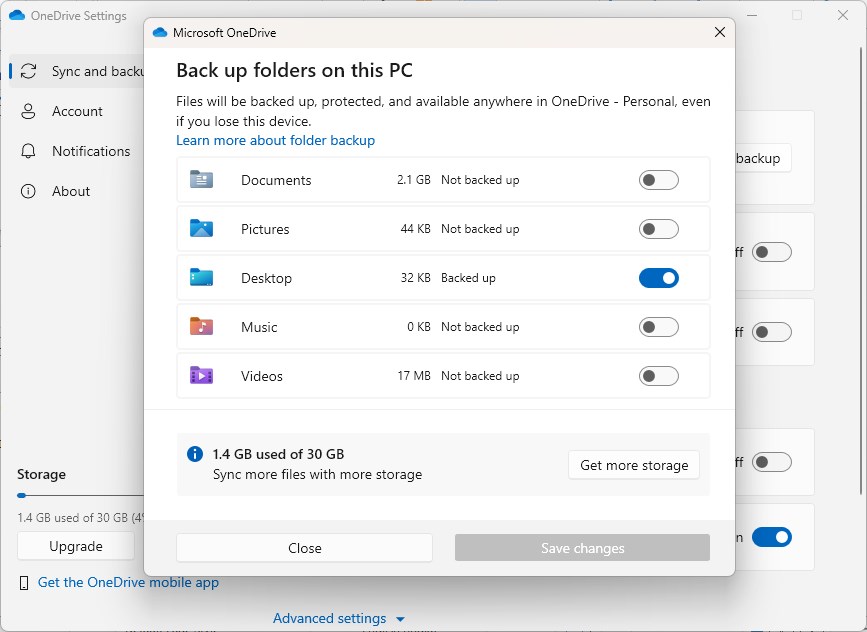
Neowin reports that a new installation of Windows 11 automatically turns on the OneDrive folder backup, so your Desktop Pictures, Documents, Music, and Videos directories get uploaded to the cloud without your permission.
You may ask, what is the big deal if Microsoft silently enabled automatic backup of folders to OneDrive? Well, if a user has a lot of data in their folders, they are going to hit the 5GB storage limit pretty quickly, and most people will not know what to do. This will allow the company to promote the Microsoft 365 plan, which non-tech savvy users may think is a good idea to pay for.
This is not the first time Microsoft has pushed OneDrive aggressively to users. The Redmond company began adding notifications in the Start Menu last year, which informed users that Windows can back up your files. The ad had a start backup button, which when interacted with, opens OneDrive and sets it up for the user. If you thought those Start Menu ads were annoying, imagine how the notifications if OneDrive is automatically enabled would look like.
Microsoft also briefly tested a new way to close the OneDrive app, where you had to select a reason for quitting OneDrive. This change did not last long after the company received backlash from users.
OneDrive is not a bad app or service per se. I use it with a slightly higher storage limit, but I can definitely see why it can be annoying for users with a free account, who may have to put up with the constant reminders nagging them to upgrade their storage. Google does this too, especially if you use Google Photos on your Phone.
Anyway, if you want to opt out of OneDrive's folder backup. Open OneDrive and go to the app's Settings > Sync and backup > and click on Manage Backup. This will allow you to turn off all the user folders that you don't want to back up to the cloud storage service. The only problem I have with OneDrive is that it does not allow users to select the local folders that we want to back up. Why limit it to the user folders?
I wonder if this automatic folder backup to OneDrive will play a part when Windows Recall is released to the stable channel of Windows 11. That could be a recipe for disaster.
Do you use OneDrive?
RECOMMENDED NEWS

Google Drive for iOS gets a document scanner
The Google Drive for iOS has been updated to introduce a new feature, a built-in document scanner. ...

NewPipe update brings access to Live, Shorts and other content on YouTube
NewPipe is a streaming frontend for Android that supports services such as YouTube, Bandcamp or Sou...
Microsoft Edge's latest AI tool sends open websites to Microsoft
Microsoft Edge's latest AI feature helps users put open tabs into groups for improved management. T...

Mozilla blames recaptcha issue in Firefox on Google
Mozilla confirmed a recaptcha issue in the organization's Firefox web browser yesterday evening. ...

Google Search adds links to archived webpages from Internet Archive's Wayback Machine
Internet Archive has announced that it has entered a partnership with Google to display links to ar...
TikTok Returns to U.S. App Stores Amid Ongoing Uncertainty
TikTok has been reinstated on Apple's App Store and Google's Play Store in the United States after ...
Comments on "Windows 11 set up is automatically enabling OneDrive folder back up for users" :