Microsoft lists reasons why Windows 11 is better than Windows 10 but forgets to mention this
Windows 10 is a dying operating system. Microsoft plans to end support for Windows 10 in October 2025. While customers may extend support by up to three years, they have to pay Microsoft for that privilege.
It should not come as a surprise that Microsoft's primary goal is to get customers to migrate to Windows 11. Existing PCs may be upgraded to Windows 11, and if that is not possible, Microsoft recommends to buy a new PC with Windows 11 instead.
Microsoft published a comparison table to highlight the advantages that Windows 11 has over Windows 10. The list compares Windows features and lists several that are Windows 11 exclusive. It is a biased list, as Microsoft's intention is to get customers on Windows 11.
Windows 11 exclusive features
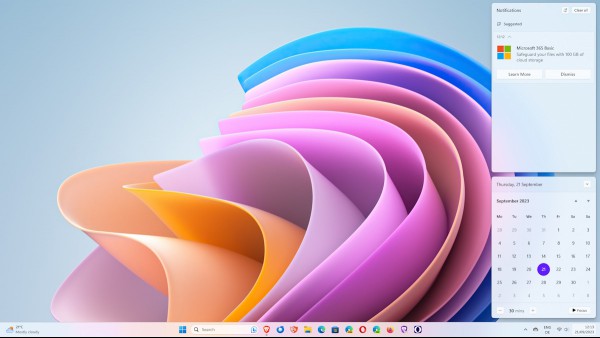
Microsoft lists the following features that are exclusive to Windows 11:
- New user interface that "is easier on the eyes and easier to use".
- The Widgets interface that displays news and other information.
- Smart recommendations in the Start menu and File Explorer.
- File Explorer tabs.
- Energy recommendations to track energy efficiency.
- Passkeys integrated with Windows Hello.
- Wake on approach. Lock on leave.
- Smart App Control by limiting application installs to those "with good reputations".
- Seamless redocking.
- Live captions.
- Narrator supports natural voices.
- Windows Studio Effects for video calls (only on certain Qualcomm devices).
- Auto HDR.
- Dynamic Lighting.
- Cross Adapter Scan Out to "reduce latency and increase frame rates on gaming laptops".
- Windows games optimizations.
- Controller bar to jump back into games.
You can check out the full list here.
The list is surprisingly small. The usefulness of many depends largely on how the Windows PC is used. Non-gamers may find all gaming related exclusive features not appealing.
Some features may also appeal less to certain users. Smart recommendations or Widgets, for example, are not liked by all Windows 11 users.
Here is what is missing
Microsoft does not list a single feature that is exclusive to Windows 10. This is understandable, as the company wants to convince customers to use Windows 11, not to stick to Windows 10.
This Microsoft support page lists features that are deprecated or removed in Windows 11.
Here are the highlights:
- Start Menu Live Tiles.
- Taskbar cannot be moved to the side or top anymore.
- File Explorer lacks option to save searches.
- Desktop wallpapers do not sync anymore.
- Internet Explorer replaced by Microsoft Edge with IE Mode.
Not everyone likes or uses these features.
There are other developments in Windows 11, and to a lesser degree in Windows 10, that may make Windows 10 look favorable to some. One of the main issues is the introduction and acceleration of advertisement under Windows 11.
Microsoft is using Windows 11 to advertise its own products and services, and is also trying to promote apps from other developers.
Here is an incomplete list:
- The Lock Screen may show advertisement.
- Settings Home shows ads for Microsoft 365 and other subscription services, such as Game Pass.
- The Get Help shows ads.
- Weather app showed ads and MSN content; was removed again.
- App promotions in the Start menu under Recommended. Find out how to turn off App Promotions here.
- Popup ads, for instance to advertise Bing.
The elephant in the room
Millions of Windows 10 PCs cannot be upgraded to Windows 11. New or missing features do not matter for these, as the PCs will never get the offer via Windows Update to upgrade to Windows 11.
While most can be upgraded by bypassing the Windows 11 system requirements checks, some cannot. Microsoft introduces stricter restrictions in Windows 11 version 24H2, which will come out later this year.
It is possible that future updates will introduce new requirements or enforce them. Affected devices are then stuck on a particular version of Windows 11, which will run out of support eventually.
This leaves just two options to keep on using the devices:
- Stay on the unsupported version of Windows 10 or 11.
- Migrate the device to Linux.
The first option is not recommended, as it leaves the system open to potential attacks. While some of this can be mitigated, for instance by cutting any connection to the Internet, it is not practicable for most use cases.
Migrating to Linux is the second option. It is a daunting task, as it requires getting to know a new operating system from scratch.
What about you? Do you run Windows 10 on your devices? What will you do in October 2025?
RECOMMENDED NEWS
New Japanese law may force Apple to allow sideloading in iOS
A report claims that Apple may soon have to allow sideloading in iOS to comply with an upcoming reg...

Google Search adds links to archived webpages from Internet Archive's Wayback Machine
Internet Archive has announced that it has entered a partnership with Google to display links to ar...
Microsoft blocks Windows 11 24H2 update on PCs with Star Wars Outlaws and Assassin's Creed
Are your games crashing or freezing after installing Windows 11 24H2? You are not alone. Micros...

Google Upgrades Gemini App With Faster AI Model
Google has officially rolled out its new Gemini 2.0 Flash model as the default AI for all users of ...

Gmail: Google plans to end SMS verification in favor of QR codes
For some time now, Google has been asking for a mobile phone number and verification when new custo...
Microsoft's Bing gains momentum as Google sees decline in market share
Microsoft Bing's usage is gaining popularity among users. The company has to thank Copilot for its ...
Comments on "Microsoft lists reasons why Windows 11 is better than Windows 10 but forgets to mention this" :