Microsoft introduces Passkeys support for consumer accounts
Microsoft is celebrating World Password Day by announcing a new feature. All Microsoft consumer accounts now support Passkeys.
Microsoft first added support for Passkeys in Windows 11 last year, but it only supported a few services, including Gmail. Now, the company has enabled Passkeys support for all consumer accounts, i.e. home users. You can use the passwordless login method to sign in to your Microsoft accounts. It seems rather strange that it has taken Microsoft a full year to add support for its own services.
Passkeys can be used to sign in to Microsoft apps and websites on desktop and mobile browsers. You may also use it with Microsoft 365 and Copilot. Passkeys contain your account credentials and consist of a cryptographic key pair, one of which is stored securely on your device, while the other one is saved by the website. Since the sign in method require both keys to unlock access to an account, passkeys are phishing-resistant, as opposed to traditional passwords which can be stolen, leaked, hacked, etc.
How to set up a Passkey for your Microsoft account
1. Visit the Security page for your Microsoft account.
2. You will be greeted by a pop-up that presents you with various options.
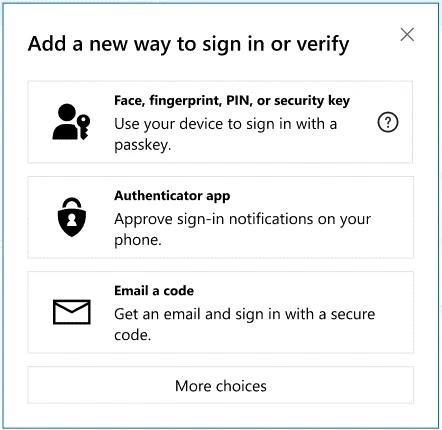
3. Select the first one, which allows you to sign in with a passkey with your face or fingerprint, or set up a PIN, or a security key.
4. Next, you will need to select where the passkey should be saved. There are three methods to save the passkey. You may use your biometric data, which requires a phone or set up a PIN, or choose the security key option if you use something like a YubiKey.
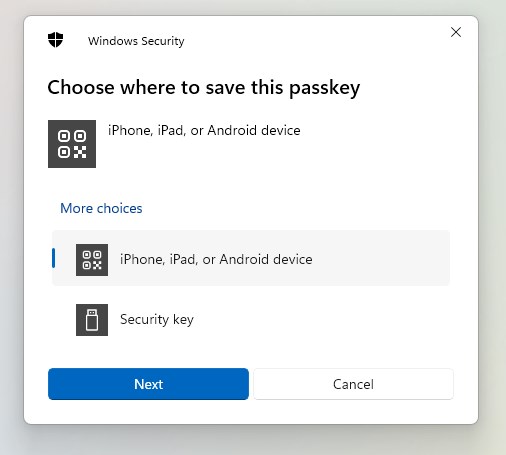
Note: You can also save your Passkey in third-party apps like Bitwarden Password Manager. But, for the sake of this tutorial, I saved my Passkey using Face ID on my iPhone.
5. Scan the QR code displayed on the screen with your phone's camera app, and it should prompt you to save a passkey. Proceed, and it should save the login credentials securely on your device.
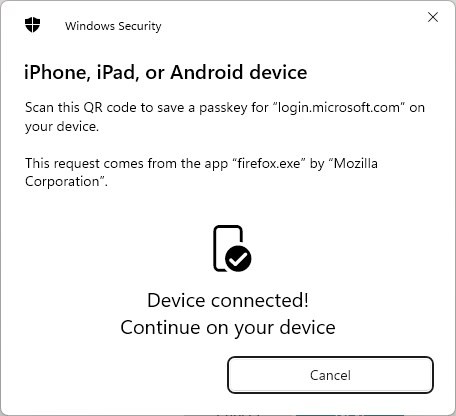
6. Once you have set it up, you can use the passkey to log in to websites and apps without entering your password.
And yes, it works across all browsers including Chrome, Edge, Firefox, etc. If you lose your device, you can sign in to your account using your password, and revoke the passkey. Passkeys can be synced with devices The mobile versions of Microsoft's apps do not support passkeys yet, the company's announcement mentions that it will roll out the feature for its Android and iOS apps in the coming weeks.
Google says Passkeys were used 1 Billion times in less than a year
On a side note, Google has published some details about Passkeys. The Mountain View company says that passkeys were used to authenticate users more than 1 billion times across over 400 million Google Accounts, in less than a year. Google says it will roll out support for passkeys in its Advanced Protection Program (APP), which protects individuals at high risk of targeted attacks such as campaign workers and candidates, journalists, human rights workers, etc.
Passkeys are clearly becoming popular across platforms. Password managers including Bitwarden, KeePassXC, 1Password and Dashlane have added support for Passkeys. WhatsApp Messenger recently announced that it has added an option to use the passwordless login method in its iOS mobile app, having added it to its Android app last year.
Do you use Passkeys?
RECOMMENDED NEWS
Apple releases iOS 17.2 RC update
Apple has begun seeding the iOS 17.2 RC update to testers in the beta channel. The update brings th...
Apple faces tough challenges against antitrust regulators in the U.S. and EU
Apple has a rough ride in 2024, as it faces antitrust battles in the U.S. and the European Union. T...
Windows 11 version 21H2 and 22H2 will reach end of support in October, forcing an automatic upgrade to 23H2
Microsoft has announced that it will stop servicing Windows 11 version 21H2 and 22H2 later this yea...

Netflix launches cheaper extra members subscription with a catch
Netflix announced the launch of a new extra members option. Standard and Premium subscribers may ad...

How to fix RustDesk not working on macOS
Today, we are going to discuss how to fix RustDesk not working on macOS. This tutorial will allow y...

Here is why Microsoft's "uninstall Edge" page offers no instructions to remove the browser
Windows users who do not want to use Microsoft Edge have two main options: ignore the web browser a...
Comments on "Microsoft introduces Passkeys support for consumer accounts" :