Bitwarden launches passkeys support in mobile apps for Android and iOS
Users of the password management solution Bitwarden are one step closer to full passkeys support.
The organization launched new beta apps for Android and iOS earlier this month that introduced limited passkeys support.
Good to know: Passkeys is a new authentication standard. It uses generated keys instead of passwords for authentication. These are considered more secure, as they cannot be guessed and are resistant to password attacks such as phishing.
The official Bitwarden Password Manager supports creating, storing, and syncing passkeys already. The launch of passkeys support in the beta apps syncs passkeys between all devices.
Tip: Bitwarden itself supports passkeys. You can check out my guide on signing in to Bitwarden using passkeys.
Limitations
Passkeys support is still limited in the Android beta version. The feature requires a device with Android 14 or newer. Google introduced support for passkeys in the Android version.
Another limitation of the Android beta app is that passkeys are only supported for web browsers that support it. Sign ins to apps using passkeys are not yet supported.
Signing up for the beta
If you want to test passkeys support, you may join the beta program to do so.
Word of warning: beta apps are test versions. These should only be installed on non-production devices.
Apple iOS:
- Download the official Apple TestFlight app from the App Store.
- Use this link to join the program.
Android:
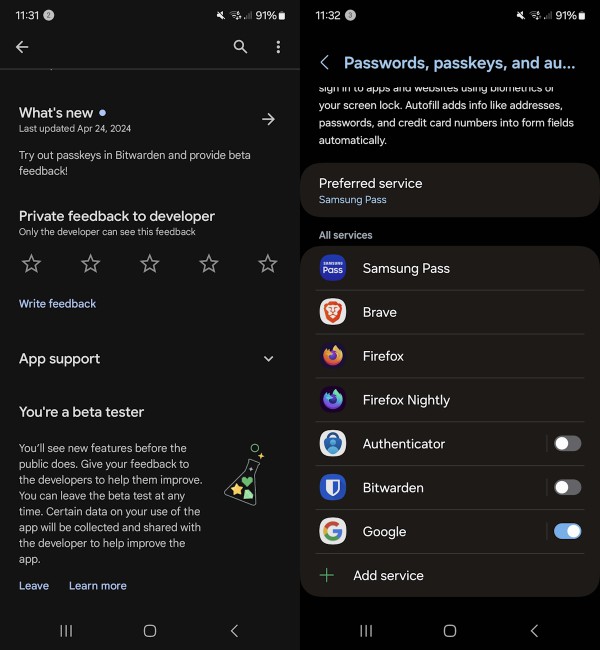
- Open the Bitwarden app on Google Play on the Android device.
- Scroll down to the "Join the beta" section.
- Select the join link.
- Confirm joining the beta program by selecting join in the confirmation prompt that opens.
- Beta joining may take a few minutes. If nothing happens, go back and open the app on Google Play again.
- Activate the update button to install the latest beta release.
Note: you can leave the beta at any time by selecting the leave link and following instructions.
Also note that on Android, you need to open Settings > Auto-fill > Passkey management in Bitwarden to configure Bitwarden as the passkey provider. You may also do that directly in the Android settings under General Management > Passwords, passkeys, and autofill (may vary depending on Android manufacturer).
Closing Words
All major password managers will introduce support for passkeys in the not so distant future. KeePassXC introduced passkeys support in March 2024
It is an upcoming standard that is supported already by a good number of popular sites, services, and apps. You can use them to protect your Google account, Amazon account, WhatsApp on Android, PayPal, Nintendo, Sony Playstation, and many more.
Wider adoption, especially on the user side, will take longer. Android, for instance, introduced support in Android 14 only, which was released last year.
What about you? Do you use passkeys already for certain services?
RECOMMENDED NEWS

Windows 11 Development: overview of the November 2023 changes
Microsoft announced and introduced several important changes in November 2023. The company released...
Chrome 121 ships with security updates and new AI tools
Google released new version of its Chrome web browser today. Google Chrome 121 Stable is now availa...
Google integrates Chat with Gemini option silently into Chrome
It is probably only a matter of time before all Chrome users gain access to Gemini directly in the ...

Google Chrome: removal of uBlock Origin and other unsupported extensions has started
More and more Google Chrome users are receiving popup notifications that inform them that one or mu...
Google's iOS app is injecting Search links on websites
Google has added a new kind of ad that will appear as clickable texts on third-party websites. The ...
Apple Launches New App to Make Event Planning Easier Than Ever
Apple has unveiled Apple Invites, a brand-new app designed to help users create and manage invitati...
Comments on "Bitwarden launches passkeys support in mobile apps for Android and iOS" :