Tor launches WebTunnel Bridge as another way to bypass censorship
The Tor Project announced the immediate release of WebTunnel Bridge, a new way for Tor users to bypass censorship. Not all Tor users may fire up the official client to connect to the network and access content on the Internet that would otherwise be blocked.
Depending on the environment, default Tor browser and network connections may not work. This is a problem that so-called bridges attempt to solve. Think of a bridge as a way to access Tor indirectly. There are several options available, and the latest one is WebTunnel Bridge.
The main idea behind WebTunnel Bridge is to obfuscate anything that has to do with Tor. It is designed to look like regular encrypted web traffic using HTTPS. In other words, automated systems that monitor network connections for certain traits or patterns cannot link WebTunnel Bridge traffic to Tor.
Another positive feature of WebTunnel Bridge is that it can be configured to be on the same network endpoint as websites. Anyone checking the connection manually, by loading the address in a web browser or other tool, will notice that the website is being loaded. There is no indication that the same connection may also be used to fuel Tor.
The Tor Project says that this new way of circumventing censorship is ideal for environments that use protocol allow-lists and "a deny-by-default network environment".
Using WebTunnel Bridge
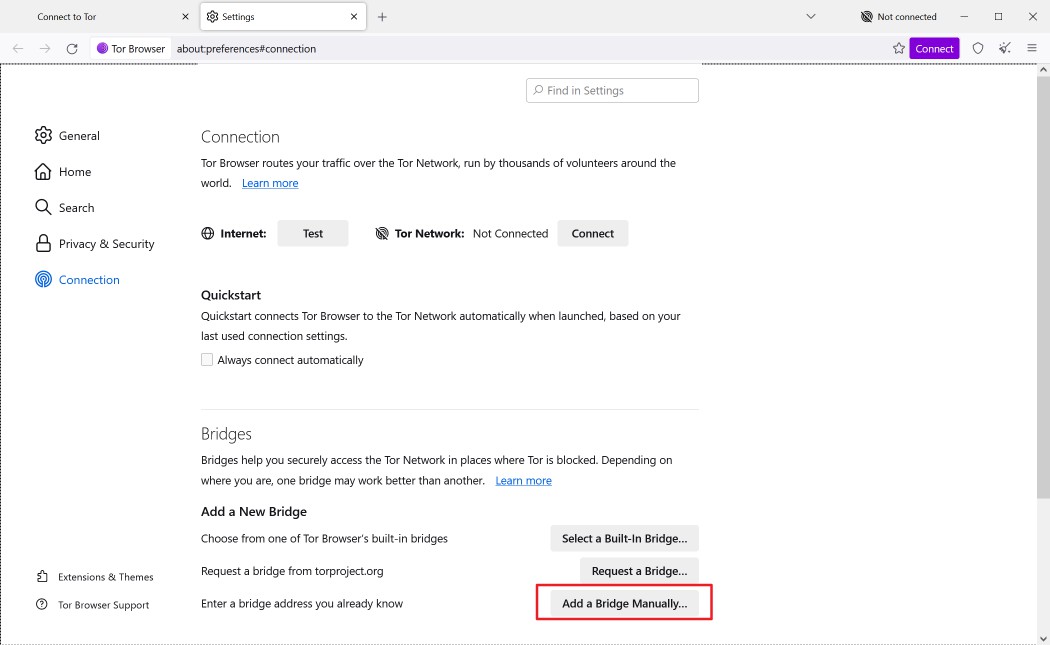
Using the WebTunnel Bridge is slightly more complicated than using Tor directly. Here are the required steps:
- Visit this special Tor Project website. It is the Get Bridges page on the website, which allows you to gain access to bridges.
- Select webtunnel from the menu on the page.
- Activate the "Get Bridges" button.
- Solve the captcha that is displayed.
- Copy the bridge line.
Now switch to the Tor Browser application on the system. If you do not have Tor Browser installed, you may download it from the official download page.
It is available for desktop systems and for Android. Open the connection preferences with a click on "configure connection". There you need to activate the "add a Bridge manually" button and paste the bridge line into the form field. Select connect to start the connection process. The process is similar on Android.
Closing Words
The Tor Project is constantly looking for bridge operators. A support page is available that provides technical information on creating webtunnel bridges.
The new webtunnel option should help Tor users from around the world, especially in restrictive environments that block regular Tor use.
Now You: have you tried Tor or Bridges recently?
RECOMMENDED NEWS

Open extensions on Firefox for Android will be available from December 14
Mozilla has announced that it will allow Open extensions on Firefox for Android from December 14. U...

Winamp source code released, but developers criticize its restrictive license
The legacy media player, Winamp, has gone open source. But the license has come under fire from the...
NordVPN’s New Tech Claims to Outsmart VPN Blockers—Here’s How
NordVPN has introduced a new protocol, NordWhisper, which it claims can help users bypass VPN block...

Mozilla extends Firefox Support for Windows 7 to September 2025
When Microsoft ended support for Windows 7 officially for most users in 2023, it soon thereafter st...

Google brings multimodal search to AI Mode with enhanced visual search
Google is busy upgrading its Search with new AI features to retain its audience. The tech giant has...

Oblivion Remastered update breaks DLSS and Frame Gen on PC
The recent update for The Elder Scrolls 4: Oblivion Remastered has raised concerns among players us...
Comments on "Tor launches WebTunnel Bridge as another way to bypass censorship" :