How to block account changes on iPhone using Screen Time
Apple recently added a feature called Stolen Device Protection to iOS 17.3, which helps prevent thieves from changing your Apple ID or reset the device. However, the feature is not available for older iPhones. But, there is another way to block account changes on your phone.
You may probably be aware of this, but iOS has an option called Screen Time, which is designed as a parental lock feature to restrict the time that their kids spend on a device. Refer to Apple's website to learn how to control Screen Time for managing your kids devices.
Besides parental controls, Screen Time has some useful security features, which includes blocking access to Apple account changes. This feature will prevent account changes in iOS' Settings > Accounts & Passwords, so a thief who has your phone will not be able to remove your account from your iPhone. Similarly, you can also block unwanted changes to your passcode.
Screen Time is not as secure as Stolen Device Protection. A thief can remove or reset the Screen Time passcode if they are aware of your device's passcode and Apple ID and Password. But since it adds a couple of extra layers of security, I recommend enabling the feature to protect your data.
Note: The Screen Time passcode is different from your iPhone's device passcode (used to unlock your screen). Screen Time is supported on iOS 12 and later.
How to block account changes on iPhone using Screen Time
1. Go to Settings > Screen Time.
2. Enable it and set a separate passcode for Screen Time.
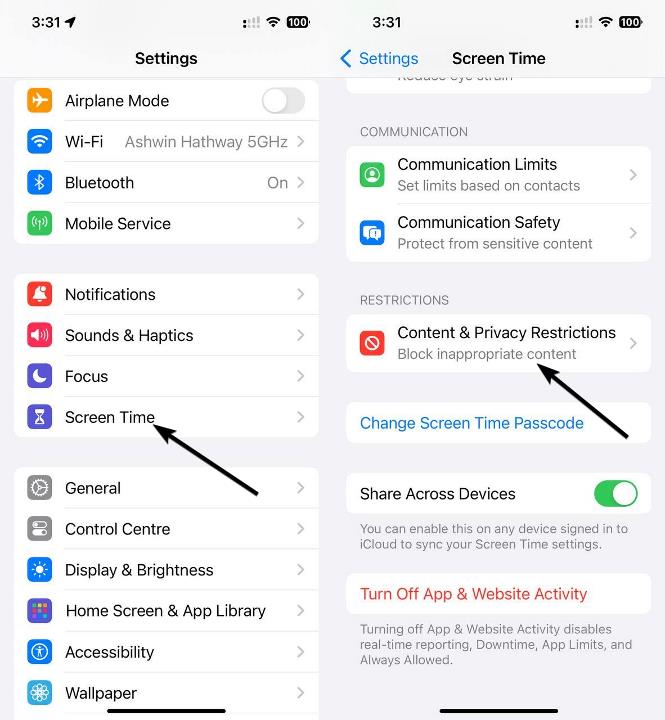
3. Now, scroll down the list of options and tap on Content & Privacy Restrictions.
5. Scroll down to the last section, "Allow Changes", and tap on "Account Changes" and set it to don't allow.
6. Go back to the previous screen and tap on "Passcode Changes" and set it to don't allow.
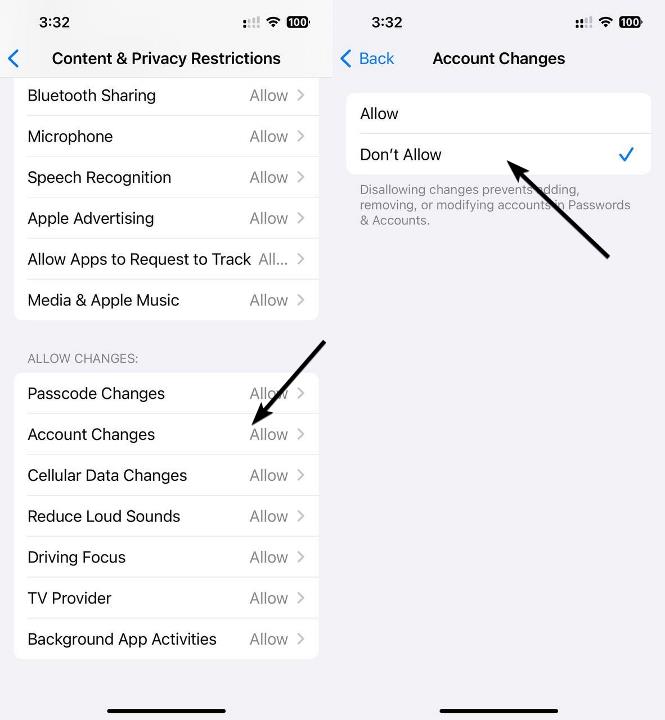
Now, nobody can change your device's Screen Time passcode, or make any changes to the Account without the knowledge of the Screen Time passcode. It will also hide some options such as "Face ID & Passcode" completely.
This might surprise you, but many iPhone users don't use a passcode. They are misinformed, and believe that screen locks are inconvenient and slow. A good case and screen guard can save your phone's display and rear panel from drops, it's kind of like insurance for the hardware. Let the screen protector get scratched or break, it's cheaper to replace a $20 screen protector, than a display that might cost $200-300 or more. But, you can't put such a price tag on your data, your family photos, browsing habits, shopping patterns and other personal data are priceless. You should never choose convenience over the security of your data. I strongly recommend using a passcode to protect your online identities, your banking information, photos, contacts, etc.
Screen Time can be useful if you don't want to use Stolen Device Protection. But, it is worth noting that the latter offers additional security barriers such as a successful biometric authentication, i.e. Face ID or Touch ID, before allowing access to your Apple ID, iCloud Keychain, Payment Methods, etc.
RECOMMENDED NEWS
Linux Mint 21.3 is now available with experimental Wayland support
Linux Mint 21.3 is the third and final point update for the Linux Mint distribution. The developers...
Microsoft is pestering Windows 10 users with full-screen pop-ups to upgrade to Windows 11
Microsoft is displaying a full-screen pop-up on Windows 10, to prompt users to upgrade to Windows 1...

AMD plans to make huge game downloads smaller in the future
Computer games seem to grow bigger with each passing year. Gone are the days that an entire game fi...
VLC to add support for offline AI subtitles and translations
VideoLAN's open-source video player has reached 6 billion downloads. The developers celebrated the ...
Meta launches Llama 4 with three new AI models: Scout, Maverick, and Behemoth
Meta has unveiled its latest advancements in its Llama series. The upgrades for Llama 4 bring three...
Google is ending support for country-code Google domains like google.fr or google.co.uk
Traditionally, Google has maintained a large number of country-code domains such as google.de or go...
Comments on "How to block account changes on iPhone using Screen Time" :