Memory Cache: local AI for Firefox that you feed
Current integrations of AI in web browsers rely on remote connections to servers. This is where the processing happens. Tools like Microsoft Bing, Brave's Leo or Google Bard require that connection to work at all.
Mozilla's Memory Cache experiment works in a different way. There are two main distinguishing traits. First, that it runs locally only on the user system. This is good for privacy, but it also has some downsides.
Second, because it was not trained with large sets of data. Instead, Memory Cache learns from the files that the user gives it access to. Since it is an experiment, everything is not polished at this stage, but the interesting approach warrants a closer look.
Memory Cache at a glance
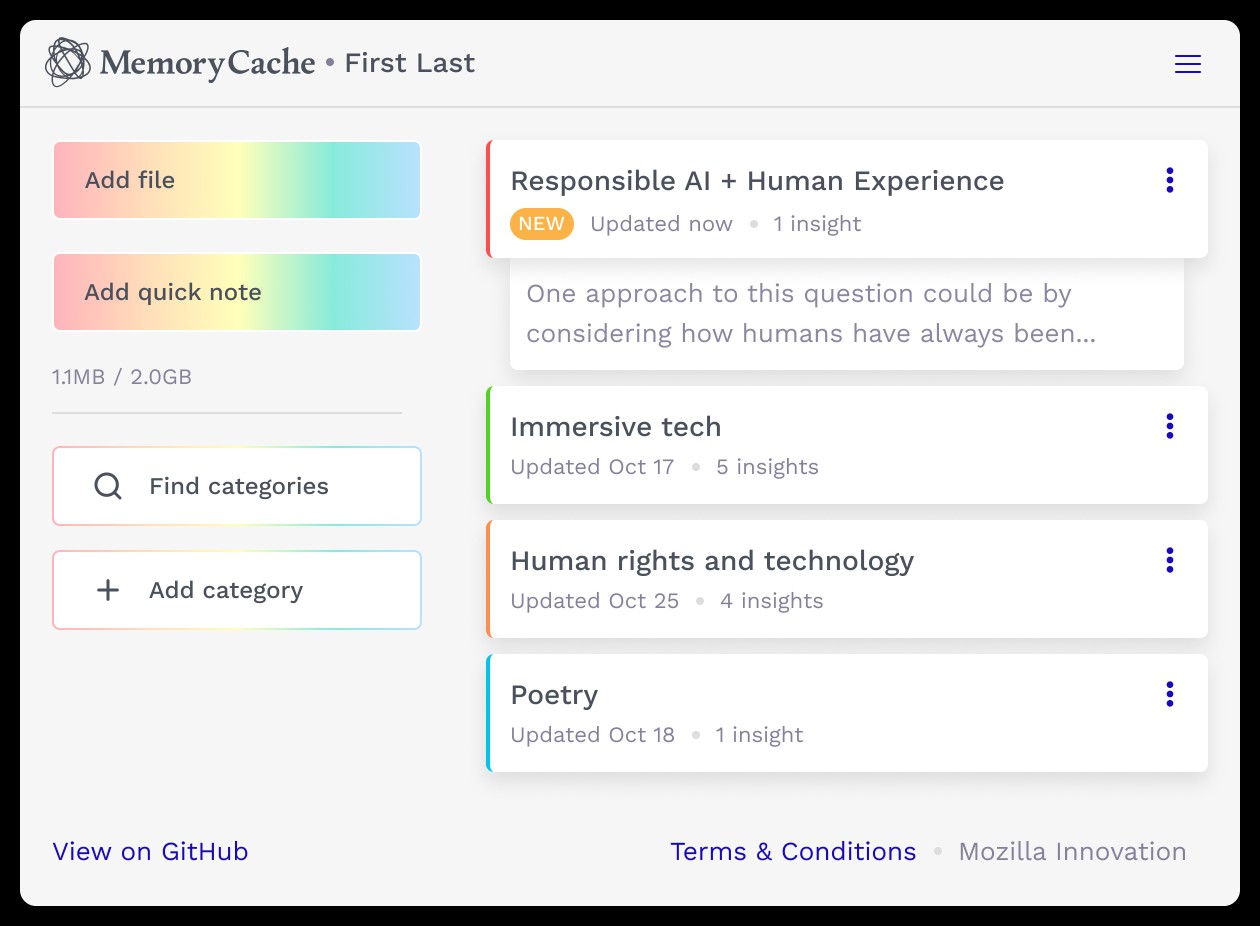
Memory Cache uses an older version of privateGPT. This technology allows users to interact with an AI that allows users to "ask questions about [their] documents using the power of Large Language Models". As the name implies, privateGPT works without Internet connection and the developer says that it is 100% private, meaning that data never leaves the execution environment.
Mozilla's Memory Cache project combines privateGPT with a Firefox add-on. The organization describes the technology in the following way: "MemoryCache, a Mozilla Innovation Project, is an early exploration project that augments an on-device, personal model with local files saved from the browser to reflect a more personalized and tailored experience through the lens of privacy and agency."
In other words: it learns and interacts using files that the user gives it access to. The process is is not as comfortable as it could be, as it requires that you feed it with specific files. These can be filed into categories to distinguish them from each other.
Here are some examples. You want to learn a new programming language, about a historic event or about a specific computer game. You begin by feeding the AI documents, webpages with information that are turned into PDFs for the AI to read. The AI learns using these documents and you may then interact with it.
Say, you want to know how you can level up in the game Bloodbourne. If you fed the AI the right documents, it knows how to do that and will hopefully tell you how. This happens without sending the request to an Internet server and waiting for a response, all the while informing whoever operates the server about it as well.
Closing Words
Memory Cache is an experiment. It is unclear if something major will come out of it that Mozilla would implement in the Firefox web browser. The current approach is quite manual. It appears that the team is considering adding automation to the tool.
Ideally, it could be turned on and off in Firefox so that some browsing would be picked up by automatically, but that you could still prevent it from absorbing everything.
Such an AI could also help you find previously visited sites using natural language.
Now You: would you use a private local AI if it would be available in your browser?
RECOMMENDED NEWS

Memory Cache: local AI for Firefox that you feed
Current integrations of AI in web browsers rely on remote connections to servers. This is where the...

iOS 17.5 and macOS Sonoma 14.5 update adds anti-tracking feature, offline support for News+
Apple has released the iOS 17.5, macOS Sonoma 14.5 and iPadOS 17.5 updates. The new software comes ...

Spotify Premium prices have increased again in the U.S.
Spotify has announced that it has increased the prices of its Premium plans, again. This is not rea...

Microsoft's Weather app now displays more ads
It's raining ads in Windows 11. The Microsoft Weather app in the operating system now displays more...

Researchers Utilize Super Mario Bros. to Benchmark AI Performance
Researchers are increasingly turning to the classic video game Super Mario Bros. as a benchmark for...
Meta launches Llama 4 with three new AI models: Scout, Maverick, and Behemoth
Meta has unveiled its latest advancements in its Llama series. The upgrades for Llama 4 bring three...
Comments on "Memory Cache: local AI for Firefox that you feed" :