Protect your Discord account with a Security Key
Users of the chat app Discord may now protect their accounts using security keys. The developers of Discord have added the option to the existing arsenal of multi-factor authentication options that the service supports.
Used by over 500 million users worldwide, Discord is a lucrative target for malicious attacks such as phishing. Discord users are encouraged to add a two-factor authentication protection to their account to protect it better against phishing and other attacks that target the account.
Up until now, users could use an authenticator application to add this second layer of security to the account. This system works through third-party authentication apps, such as Google Authenticator, Microsoft Authenticator, Aegis or Authy, that generate temporary codes when opened. Discord requests the code after username and password have been checked successfully. The user needs to type the code to gain access to the account.
Attackers who manage to gain access to the username and password, for instance through phishing, still need access to the temporary code to sign-in successfully to the account.
WebAuthn is a new security standard that is establishing itself as an alternative to using temporary codes. It offers several advantages, but there are also disadvantages that users need to be aware of.
The main idea is that the security key, also known as passkeys, is generated on the user's device. A public part of the key is transferred to Discord, a private part stays on the users system. While that sounds complicated, it is not. Systems like Windows Hello or Apple Face ID / Touch ID support this functionality, but you can also use hardware keys if you prefer that.
Options include Google's updated Titan Security Key, YubiKey devices or Thetis.
One of the main disadvantages is that Security Keys are not yet supported everywhere. It may also be difficult to synchronize data between devices, if no hardware key is used. Some password managers support storing passkeys data already, including Bitwarden or NordPass Password Manager.
Registering a security key on Discord
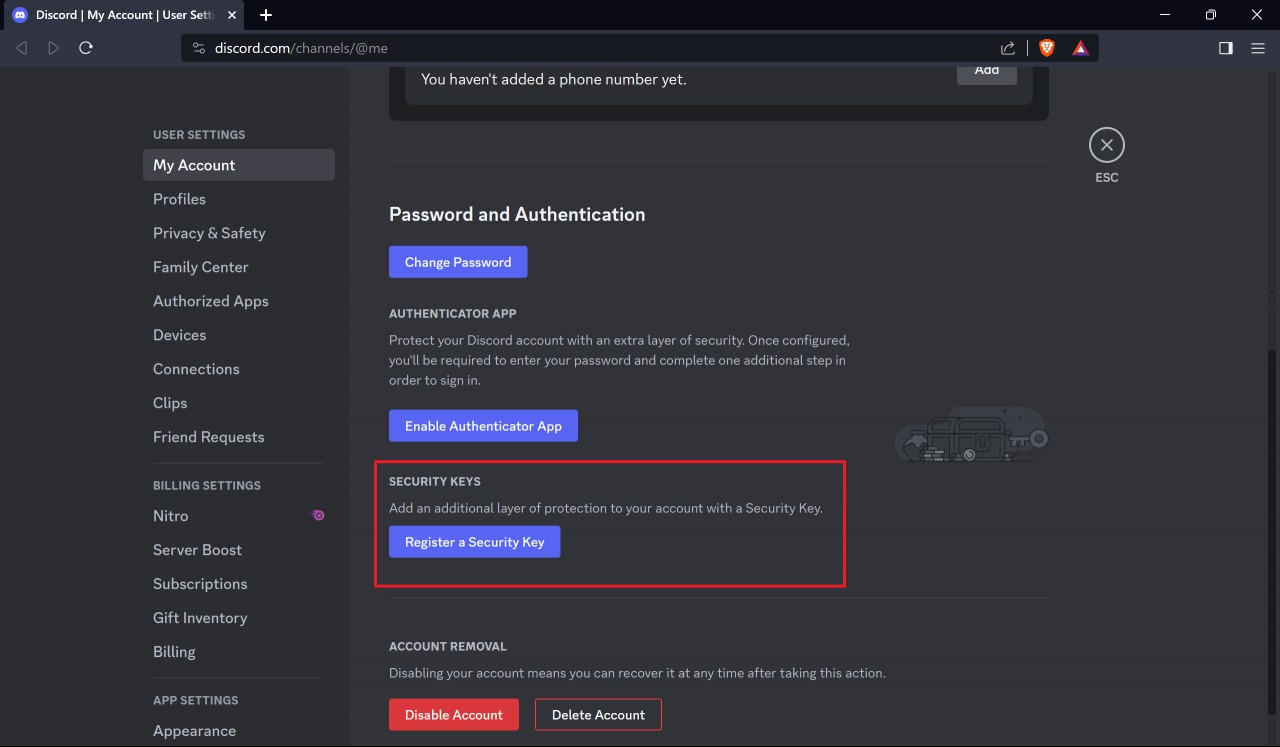
Setting up a security key to protect a Discord account is a straighforward process. Here is what you need to do:
- Visit the Discord website and sign-in to your account.
- Open the User Settings on the site.
- Scroll down the page that opens -- My Account -- until you come to the Security Keys section.
- Activate the "Register a Security Key" button to start the process.
- Type the account password when prompted to do so.
- Activate the "Let's Go" button on the next page of the process.
- The "Choose where to save this passkey" prompt lists several options. You may use a mobile device to save the passkey or a security key. Select Security Key and click Next to proceed.
- Select OK on the next screen to confirm setting up the security key.
- You are prompted now to insert the security key into an USB port.
- You may be asked to tap on a button on the hardware key to confirm the process.
- Select a Pin and confirm it.
- Name the Security Key.
- You should now get a "2FA is activated" prompt. There you have the option to download backup codes. These can be used instead of the security key. They are a last resort, for instance when the security key gets damaged or lost. Save them to a secure place, e.g., a password manager or encrypted partition.
- This is all there is to it.
You should see the following screen now when you go back to the My Account section in Settings.
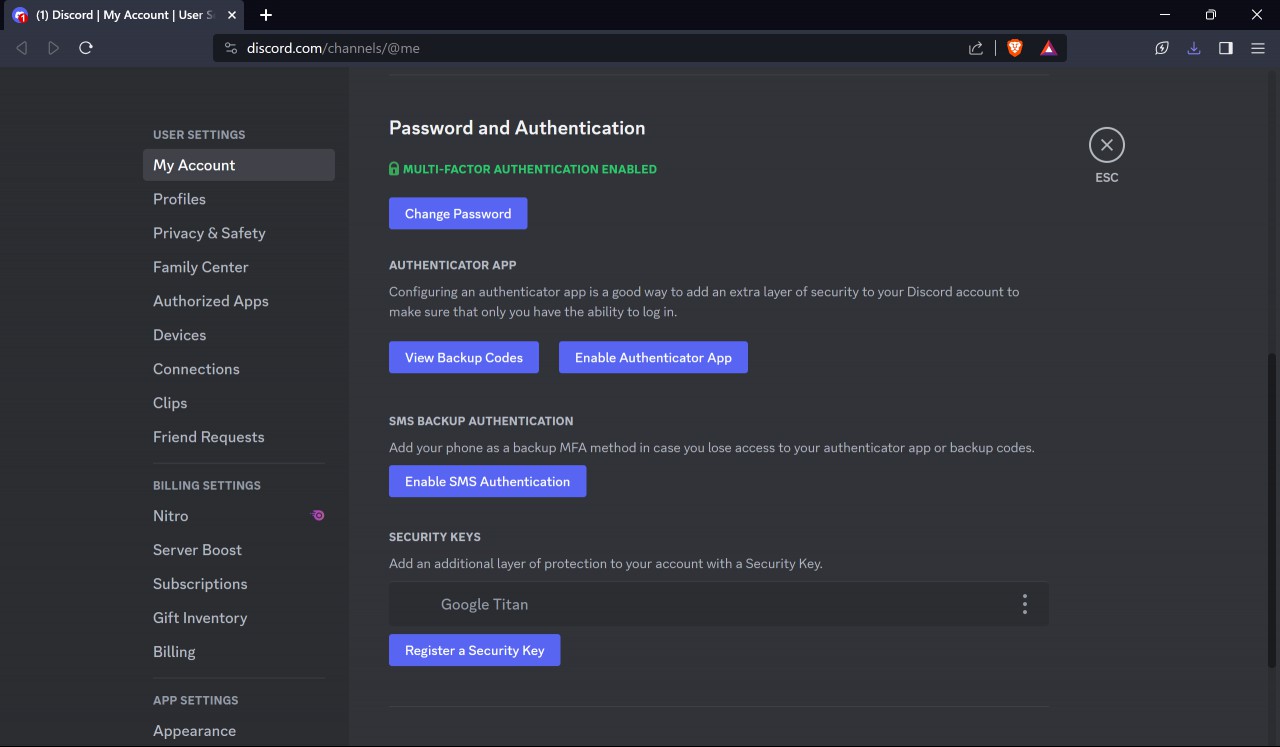
Discord should confirm on the page that two-factor authentication is enabled. You should also see the option to view backup codes and that a security key is assigned to the account.
When you sign-in from now on, you are prompted to use the security key to verify the process after you provide the username and password of the account.
Now You: do you use security keys / passkeys already?
RECOMMENDED NEWS
Windows 11 will let you change where on-screen indicators appear
Microsoft is testing new options that will allow you to choose where on-screen indicators appear in...

Windows 11 Development: overview of the November 2023 changes
Microsoft announced and introduced several important changes in November 2023. The company released...

Microsoft releases troubleshooter for HP Smart App printer issue on Windows
Some Windows 10 and 11 users started to notice the automatic installation of HP's Smart App on thei...

Bitwarden to enable two-step login for all users in the next days, sort of
Bitwarden is a popular open source password management solution that we have mentioned several time...

Researchers Utilize Super Mario Bros. to Benchmark AI Performance
Researchers are increasingly turning to the classic video game Super Mario Bros. as a benchmark for...
Google Docs introduces Audio Overviews to help users correct writing mistakes
Google has announced a new feature for Google Docs that is designed to help user's catch errors the...
Comments on "Protect your Discord account with a Security Key" :