How to try Meta's AI image generator Imagine right now
Facebook and Instagram parent Meta just launched Imagine, an AI image generator. While Meta is a bit late to the party, as there are plenty of free and paid services available already, it had the advantage of using the public image pools of its social media sites for training.
Meta's AI-powered image generator was only available in Instagram previously, but it is now available as a standalone service on the Internet as well. Powered by Facebook's image foundation model Emu, it was trained using more than 1.1 billion photos.
At its core, Imagine with Meta AI works identical to other image generators. You provide a description of the image that you like generated by the AI and wait for it to generate the image. You may use complete sentence when you instruct the AI to generate images or just a list of descriptive terms instead.
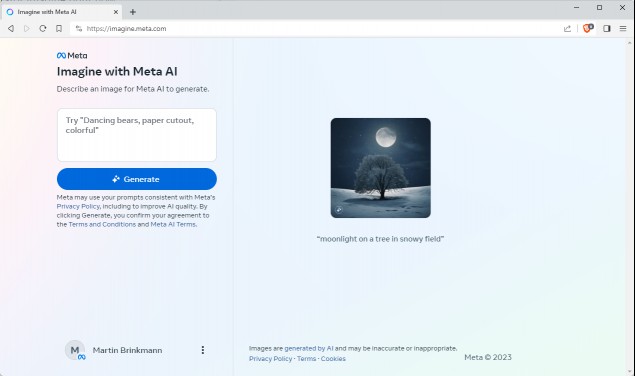
Imagine with Meta AI is free to use, but it requires a Meta account. You may use an Instagram or Facebook account to create the Meta account, or create one from scratch. Once done, you are ready to go, provided that you are connecting to the service from a supported region.
If you don't, you may use a VPN connection to the United States to bypass this limitation. The service is only available in the United States at the time of writing according to Meta's own announcement.
Imagine with Meta AI generates four images based on the description. All four are shown as thumbnails on the page and one is shown in a larger preview area.
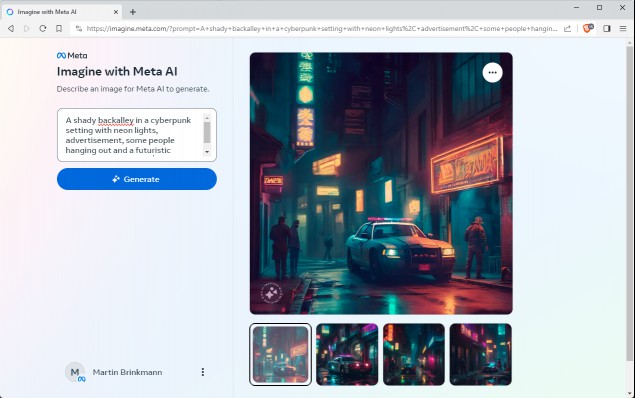
You may click through them to preview them all or select the three-dots icon of the main image to download it to the local system. The downloaded images have a size of 1280x1280 pixels and are saved as JPEG format images.
Note that the downloaded images have a watermark that reveals that they have been generated using Meta's AI image generator.
Compared to other image generators, Meta's AI is doing well. It handles complex instructions well and the outputs look good most of the time. Midjourney still produces better images all in all.
Now You: have you tried image generators? What is your favorite currently?
RECOMMENDED NEWS
Steam Game Recording Beta announced: a built-in tool to record your gameplay videos
Steam has announced a new feature in its desktop client, called Game Recording. This built-in video...
Linux Mint 22 is an attractive option for migrating away from Windows
The Linux Mint team has just released Linux Mint 22, a new major version of the free Linux distribu...
Steam updates user reviews with a helpfulness system, and it's brilliant
Valve has announced that it is updating Steam reviews with a new helpfulness system. It is finally ...
Windows 11 KB5048685 Update causes Wi-Fi and Start Menu to stop working
The KB5048685 Update seems to be causing multiple problems for users on Windows 11 23H2. Microsoft ...
Microsoft Eyes TikTok’s US Operations Amid National Security Concerns
Microsoft is reportedly in talks to acquire TikTok’s US operations from ByteDance, according to sta...
Data breach exposes 21 Million employee screenshots from a workplace surveillance tool
In a staggering privacy breach, over 21 million images documenting employee activity from a workpla...
Comments on "How to try Meta's AI image generator Imagine right now" :