Windows 11's Notepad is getting a character count on the status bar
Windows 11's Notepad is getting a couple of improvements. This includes a character count on the status bar, and a quick way to access it from Explorer.
The plain text editor in Windows has been around for nearly 40 years, but Microsoft barely added any features to it until a few years ago. The Redmond company began improving Notepad drastically over the past couple of years, by adding features like dark mode, multi-level undo and redo and a new interface in 2021. These were followed by some more user-requested features such as tabs in Notepad, and auto-save for documents over the past year.
Character Count in Notepad
And now the built-in text editor in Windows 11 is gaining another feature. Notepad is getting a Character Count on the status bar. Better late than never, I suppose. The feature should not to be confused with Word Count, Character Count is used as a reference to the length of a document, to be precise, it shows you the total number of characters that you have typed. It includes alphabets, numbers, symbols, spaces, punctuation, etc. Word Count, on the other hand, only counts the total number of words in a document, and some may argue it is more useful than Character Count.
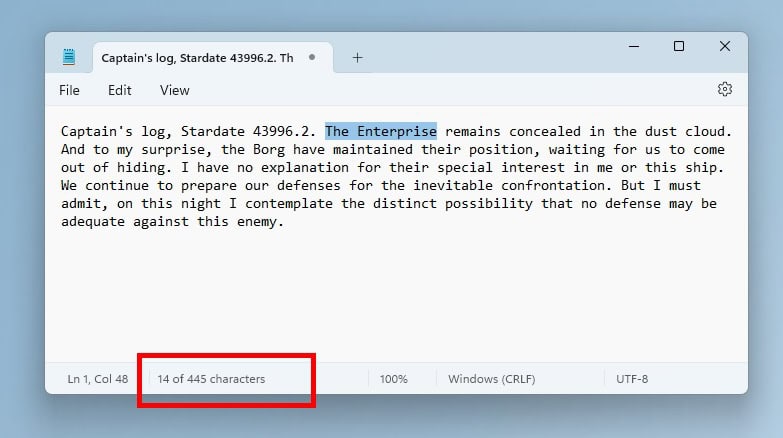
Image Courtesy: Microsoft.
According to the announcement by Microsoft, Character Count in Notepad works in 2 ways. By default, the text editor will show the Character Count of the document on the status bar at the bottom of the window. But, if you select some text in the document, Notepad will show the Character Count for the selected text, and the document's total count separately. While this is not exactly a great feature, it may be useful to some people who prefer to use the text editor for work and school.
New Shortcut to open text documents with Notepad
The File Explorer in Windows 11 now has a new way to edit text documents quickly with Notepad. Right-click on a TXT file, and you will see an option that says "Edit with Notepad." This is a faster method than choosing the Open With menu, and then selecting Notepad. Interestingly, the new context menu option works with multiple files. This can come in handy when you want to batch open several documents in Notepad with a single-click.
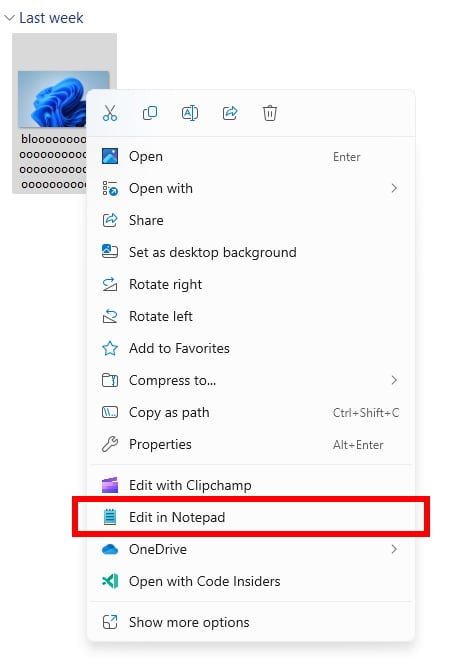
Image via Microsoft
The new improvements are available in Notepad version 11.2311.29.0, which is available for Dev Channel and Canary Channel users in the Windows Insider Preview Program.
Microsoft clearly seems to be prepping Notepad as the successor to replace WordPad, which, as the company previously confirmed, will be retired in a future Windows update. While the features that the text editor has added over the past couple of years are impressive, Notepad is still a long way behind third-party apps such as NotePad++, or a full office suite such as LibreOffice, both of which are completely free to use. Then there are alternatives like Office Online, Google Docs which one might use for free, but these don't really count as text editors, and of course they are not offline programs.
Do you use Notepad?
RECOMMENDED NEWS

Firefox 121: Mozilla ends 2023 with a bang
Firefox 121 is the last major release of the Firefox web browser of 2023. The new release introduce...
Print AI: HP injects AI into its printers
HP jumped on the AI bandwagon today when it announced Print AI for its printers. Is it a ploy to ex...

China's Open-Source AI Model 'Goku' Challenges U.S. Dominance
Another AI from China has been announced. This time, ByteDance has introduced 'Goku,' an open-sourc...

Humane's AI Pin Ceases Operations Following HP Acquisition
HP Inc. has acquired assets from Humane Inc., the startup behind the AI Pin wearable device, for $1...

Microsoft Releases Native Copilot App for macOS with Dark Mode and Command Activation
Microsoft has launched a native Copilot app for macOS, providing Mac users with direct access to it...
Microsoft suggests to trade your PC or recycle it in "end of support for Windows 10" emails
Microsoft is sending out emails to customers who still run the Windows 10 operating system to infor...
Comments on "Windows 11's Notepad is getting a character count on the status bar" :