DuckDuckGo Browser's Scam Blocker now protects you from scams, scareware
DuckDuckGo has announced some new features for its browser's Scam Blocker. It can now detect potentially dangerous scareware, scams, etc.
You may be aware of Google's Safe Browsing. DuckDuckGo's feature is similar, but in addition to blocking phishing sites, malware, the Scam Blocker now protects users from fake cryptocurrency exchanges, scareware tactics, and fraudulent/sham e-commerce sites.
The announcement says that DuckDuckGo's Scam Blocker works anonymously, without sending information to Google, because it doesn't rely on Google's Safe Browsing. The company gets a feed of malicious site URLs from Netcraft, an independent cybersecurity company. This list is updated every 20 minutes by your browser. That sounds similar to how an ad blocker's filters get updated.
Once DuckDuckGo Browser downloads the list, it checks sites against those in the list on your device, and if a dangerous website is detected, it warns you about the risks. All of this is done anonymously, i.e. your data is not sent to third parties, and the protection does not require you to sign in or register for an account, that's impressive.
When you navigate to a potentially dangerous website, DuckDuckGo's Scam Blocker will display a warning like the one in the screenshot here. You may choose to leave the site, or proceed at your own risk. The browser's built-in ad blocker prevents trackers, even the malicious ones.
DuckDuckGo's announcement also points out that Google's Safe Browsing is used in other browsers like Chrome, Firefox, and Safari, and that they send information to Google while providing warnings about phishing sites.
That's not entirely accurate. Firefox uses hashed data to protect user privacy, and Safari uses its own proxy servers instead of sending your data to Google. Similarly, Edge uses Microsoft Defender SmartScreen, Brave Browser routes the requests through its own proxy-server like Apple does, and Vivaldi uses an approximation method too. So, there are some privacy-preserving measures in place in other browsers. Still, DuckDuckGo's method might be more efficient since it relies on an offline database.
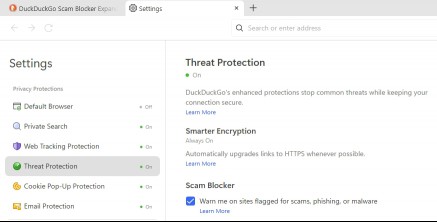
DuckDuckGo Browser's Scam Blocker features are now available for desktop and mobile. The feature is enabled by default, it can be found under Settings > Threat Protection > Scam Blocker.
RECOMMENDED NEWS
Google will disable some of its own Chrome extensions soon
If you run extensions in Google Chrome, you may one day find yourself without access to some of the...

Windows 11 Updates install faster and Microsoft has the numbers to back it up
Some months ago, Microsoft revealed improvements to Windows Update on Windows 11 that made updates ...

FBI Seizes Cracked.io and Nulled.to in Major Cybercrime Crackdown
The FBI has seized the domains of Cracked.io and Nulled.to, two well-known hacking forums associate...

Google Messages to Introduce 'Delete for Everyone' Feature in RCS Chats
Google is preparing to enhance its Messages app by introducing a "Delete for Everyone" feature for ...

Prime Gaming Offers BioShock Infinite: Complete Edition and 19 More Free Games This February
Amazon's Prime Gaming is treating members to a substantial lineup of free games this February, feat...

Meta AI Expands to Europe: Limited Features Rolled Out on WhatsApp, Facebook, and Instagram
After a year-long delay, Meta has commenced the rollout of its AI assistant, Meta AI, across Europe...
Comments on "DuckDuckGo Browser's Scam Blocker now protects you from scams, scareware" :