Meta is rolling out passkeys on Facebook for "easier sign-ins"
Passkeys is a relatively new authentication standard designed to replace password-based authentication systems in the long run. One of the main benefits is that they put an end to phishing, as nothing can be "phished" when passkeys are used. Google recommended just this month that its customers switch to passkeys or social logins from using passwords to sign in to their accounts.
While adoption takes time, many major players have introduced passkeys support already. One of the last companies to lack support for passkeys was Meta, which owns Facebook, Instagram, and WhatsApp among other online services and properties.
This changes in the coming months. Meta announced the rollout of passkeys support on Facebook this week, promising that Messenger would follow soon as well. One caveat is that Meta plans to roll out support only in its mobile applications for Android and iOS. Desktop users won't get support for passkeys at this point in time.
Mobile users may see prompts to switch to passkeys when they sign in to their accounts in the mobile Facebook application. Passkeys may also be created directly in the Accounts Center, which users may open from the settings in the Facebook application on their mobiles.
Meta notes that users may still use their passwords to sign in to their accounts, even after they set up passkeys. Another important bit is that logins with passkeys is only available on that mobile device or any other mobile device the passkeys are synced to. Desktop sign ins continue to require traditional sign-in methods such as passwords for the foreseeable future.
How to create a passkey in the Facebook application
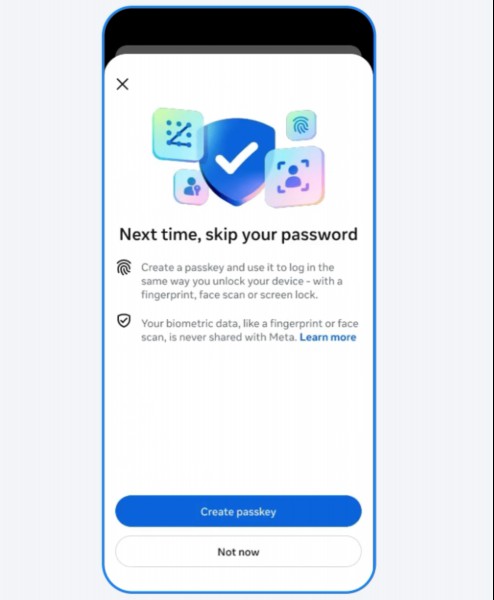
Here are the steps required to create a new passkey on the Facebook mobile application:
- Launch the Facebook mobile application.
- Open the Settings once the app has started.
- Switch to Password & Security.
- Select Passkey on the page that opens.
- Activate the "create passkey" button on the page.
- Select "create passkey" in the prompt that appears.
- Select continue and confirm the creation.
The passkey is now displayed under passkeys in the Settings. You may use it from that moment on to sign in to your Facebook account using it.
Closing Words
Passkeys support is optional at this point in time and limited to the mobile Facebook applications. That is a major drawback that may keep Facebook users who use mobile apps and the web version from switching to the new authentication standard.
Now you: what is your take on passkeys? Do you use them already for some accounts? Feel free to leave a comment down below.
RECOMMENDED NEWS

ChatGPT no longer requires an account to use, but there are some limitations
OpenAI has announced a major change to its AI-based chat service. ChatGPT is now available for use ...

Arc Browser is now available for Windows 11
Arc Browser, a Chromium-based browser, is now available for Windows. The browser was previously ava...

Firefox 133 comes with Bounce Tracking Protection and other enhancements
Mozilla has released a new stable version of Firefox a moment ago. Firefox 133 is the latest versio...
DeepSeek AI Accused of Sharing User Data with Banned Chinese Telecom
Security researchers have discovered that DeepSeek may be transmitting user login information to Ch...

"End of 10" Project's aim is to help Windows 10 users keep their PCs running for years
With Microsoft ending support for Windows 10 in October 2025, millions of Windows 10 users will be ...

Microsoft extends security updates for Microsoft 365 on Windows 10
Microsoft is set to shelve Windows 10 on October 14, 2025, when it reaches its end of its support d...
Comments on "Meta is rolling out passkeys on Facebook for "easier sign-ins"" :