Android System SafetyCore: what it does and why you may want to remove it
When Google released the October 2024 security update for Android, it made no mention of a new app that it integrated in the update. Android System SafetyCore was suddenly installed and users did not know what it did. It is probably the secrecy around this app that is worrying many Android users currently.
Google did announce its functionality in a blog post in October 2024, but without mentioning the apps' name. In 5 new protections on Google Messages to help keep you safe, it mentioned the new "Sensitive Content Warnings give you control over seeing and sending images that may contain nudity." under point four.
Here is how this works in a nutshell according to Google:
- It is an optional feature that has two main purposes:
- Scan images for nudity and blur them.
- Warn users when they are about to send images with nudity using Google Messages.
- Google says the scanning happens on the device and that it has no access to the contents of images.
- The feature is enabled for Android users under the age of 18, but disabled for adults.
In other words: Google added a new app to most Android devices that is scanning images for nudity automatically. While disabled for adults, it does run on the Android devices of minors automatically.
The app has an abysmal rating of 1.4 on Google's Play Store currently and has been installed on over 1 billion devices at the time of writing.
Many users describe it as spyware, or spyware-like and object to the automatic scanning of images. While some of those reviews are likely the result of clickbait articles, the underlying message is clear:
- Google installed a new app on user devices.
- The app scans images automatically to determine nudity.
- Google gives its word that this all happens on the local device.
User outrage might not have been this dramatic if Google would have been open about the feature in the first place. If Google would have been more transparent about this, for instance by informing users that a new application was installed as part of the Android update, explaining its purpose, and giving users the option to enable or disable it, it would probably not have come to this.
Google chose a different route. Sneak the app in without telling anyone, enabling it by default on the devices of minors, letting it scan images for nudity by default, and still not telling anyone about it.
Good news is that you can disable or remove the application from your Android device. The following paragraphs explain how this works.
How to remove Android System SafetyCore
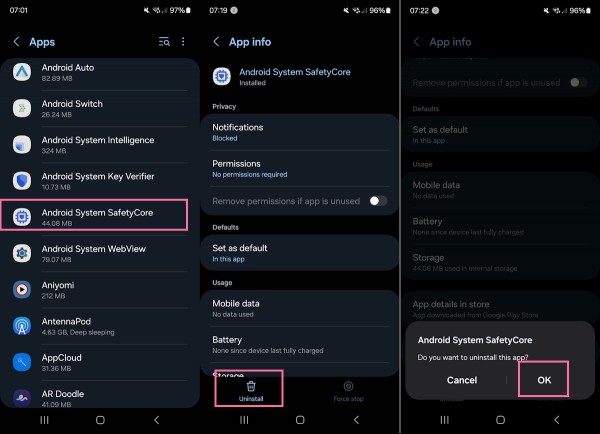
First thing you may want to do is find out if the app is installed on your Android device.
- Open the Settings on the Android device.
- Select the Apps section.
- Scroll down the list to see if Android System SafetyCore is listed there.
If the app is listed, do the following to remove or disable it.
- Tap on Android System SafetyCore.
- Tap on the Uninstall button on the page that opens. (some users may only be able to select disable).
- Confirm the removal of the app with a tap on ok.
This uninstalls the app from the device. Note that there is no guarantee that it won't be pushed to the device again in a future update.
Quick sidenote: I could not find the setting to turn the nudity scanner on or off on my device. Maybe that is the part that is still rolling out.
Now it is your turn: what is your take on this new app? Do you plan to keep it or will you remove it? Feel free to leave a comment down below.
RECOMMENDED NEWS

Mozilla VPN: security audit results and new features announced
Mozilla published the results of a security audit of its Mozilla VPN service last week. The organiz...

Microsoft's new "use Bing" prompt in Edge is missing a vital option
Microsoft Edge shows a new prompt to some users that asks them to make Microsoft Bing the default s...

Firefox 124.0 launches with new features and security fixes
Mozilla has released Firefox 124.0 Stable and Firefox 115.9 ESR. The new stable version of the orga...

U.S. DoJ could force Google to sell Chrome
The United States Department of Justice may force Google to sell Chrome. The news comes a few month...

ChatGPT on WhatsApp Just Got Smarter: Now Listens, Sees, and Critiques Memes
ChatGPT’s integration with WhatsApp is evolving, bringing new capabilities that make AI interaction...
WhatsApp introduces Advanced Chat Privacy to improve user security
WhatsApp has introduced a new feature called Advanced Chat Privacy. This option has been designed t...
Comments on "Android System SafetyCore: what it does and why you may want to remove it" :