How to block Chrome from signing you into a Google account automatically
If you are using Google Chrome, you may have noticed something strange. When you sign-in to a Google service, like Gmail or Google Drive, you get signed-into the browser automatically as well.
While some users may prefer that, as it ensures that features such as sync or personalization options are enabled, others may dislike it.
Here are a few reasons:
- You may not want Google Account-specific features in Chrome and prefer to stay signed-out because of that.
- You may want to use different accounts for different Google sites.
- For privacy.
The default setting in Chrome signs you into a Google Account in the browser whenever you sign-in on a Google-owned website.
Tip: check out our guide on disabling toast popups in Google Chrome as well.
Disable the link between Google Account and Chrome
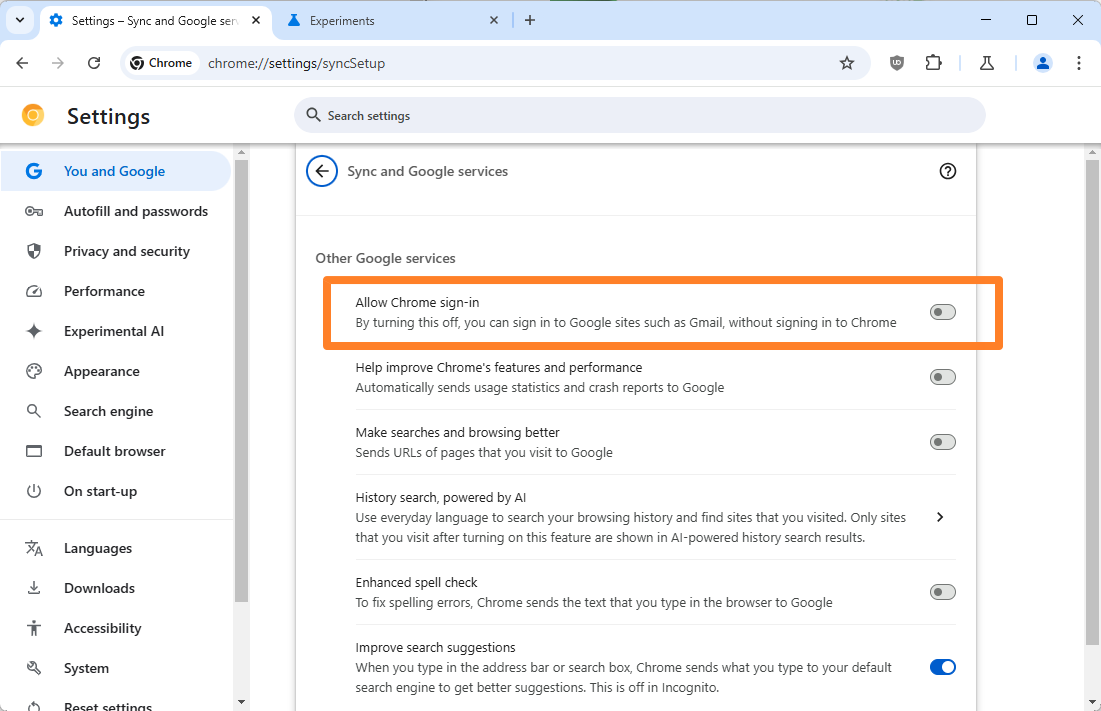
Thankfully, it is easy to disable the disable this in Chrome. Here is how that is done:
- Load chrome://settings/syncSetup in the Chrome address bar. This opens the Sync and Google services settings of the browser.
- Toggle "Allow Chrome sign-in" under "Other Google services" to disable the feature. The control should show up in gray colors when it is disabled.
Note that you may need to restart the browser before you are signed-out off the Google Account in Chrome. You can also sign-out manually during the session by clicking on the profile icon in the Chrome address bar and selecting the "sign out of Chrome" option.
Sign in to Chrome when you sign in to other Google services
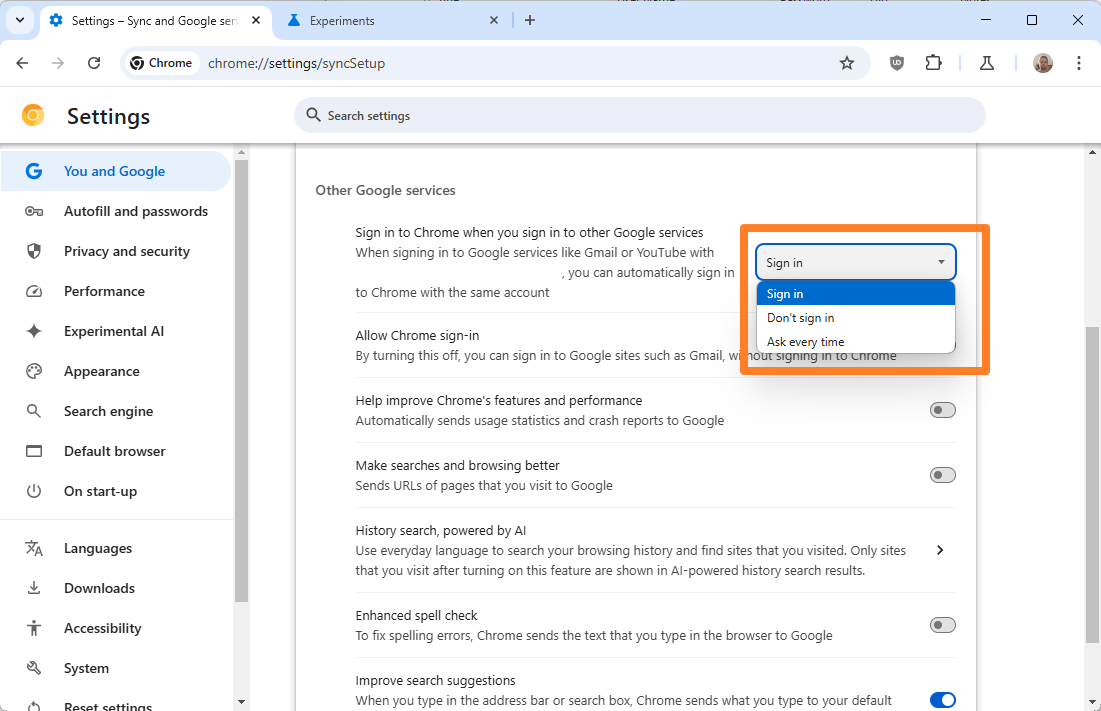
Google is working on a new feature linked to sign ins. It is available in Chrome Canary at the time, but maybe not for everyone at the time of writing.
Sign in to Chrome when you sign in to other Google services is the name of the new feature. It is set to "sign in" by default, which replicates the status quo for the most part. In other words, Chrome may sign you in automatically when you sign in on the web into a Google product.
The two other options are "don't sign in" and "ask every time". The first is identical to disabling the "allow Chrome sign-in" option outright. The second shows a prompt whenever you sign in, so that you may decide whether to sign in to Chrome as well with that Google account.
Closing Words
You could also avoid this by using a different browser. It might also improve privacy overall, considering that you would be switching from a browser that is controlled by an advertising company. You might also be able to continue using uBlock Origin in that case.
Speaking of browsers; what is your preferred web browser at the time of writing and why? Feel free to leave a comment down below.
RECOMMENDED NEWS

When will the cybersecurity company Okta ensure its own security?
On Tuesday, Okta revealed that hackers had stolen data from all of its customer support users in a ...

LogoFail vulnerability affects many Windows and Linux devices
Many commercial computers are vulnerable to a set of vulnerabilities that exploit flaws in the proc...
Firefox 121.0.1 fixes a hang and a USB security key issue
Firefox 121.0.1 will be released later today, if you are reading this on January 9th, 2024. The new...
Windows 11 24H2 won't boot if the PC does not support this CPU feature
Microsoft is changing the system requirements of the upcoming Windows 11 24H2 feature update. When ...
Beyond Deletion: How Stellar File Eraser Handles Folder Wiping and Free Space Erasure on Multiple Platforms
Each time you delete a file from your computer, you probably think that file is gone for good. In r...

OpenAI releases GPT-4.1 and GPT-4.1 mini AI models for ChatGPT
OpenAI has announced that ChatGPT users can now access GPT-4.1 and GPT-4.1 mini AI models. The good...
Comments on "How to block Chrome from signing you into a Google account automatically" :