Vivaldi Browser's new Dashboard feature reinvents the New Tab page
Vivaldi Technologies has just released a new stable desktop version of its Vivaldi Browser.
The details:
- A new Dashboard is introduced that users of the browser may customize to display nearly anything they want on the New Tab page of the browser.
- Tabs have a new floating design.
- The Feed Reader gets a much needed upgraded: folders.
How to get the new version: The new Vivaldi is already available for all supported desktop platforms. You can wait for the automatic update feature to install the update or select Vivaldi Menu > Help > Check for updates to download the update immediately.
New users may download the latest version from Vivaldi's official website.
Vivaldi: the new dashboard
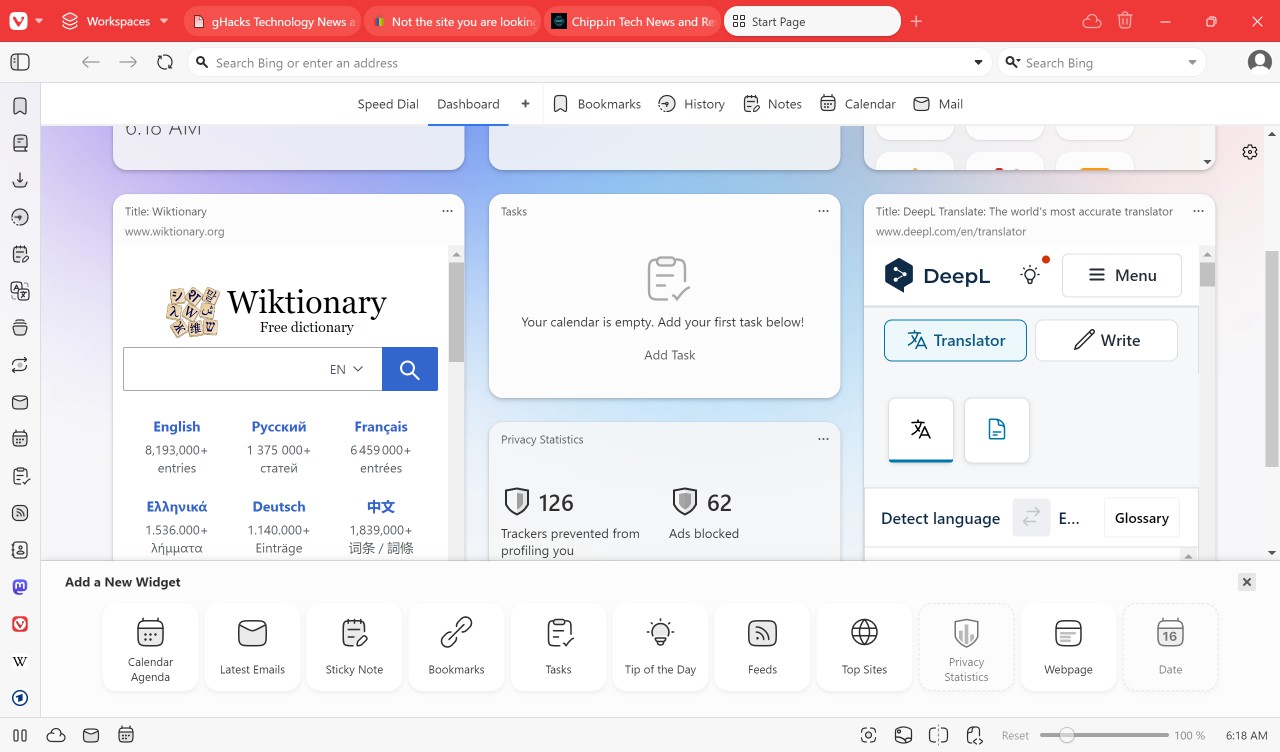
Vivaldi has not removed the default New Tab page of the browser. Engineers have added the Dashboard to it instead.
You can switch between Speed Dial and Dashboard; the browser remembers your selection automatically.
Note: Users who do not need the Dashboard may turn it off in the Settings.
What is the Dashboard? The Dashboard is a customizable user space. It displays widgets, which can be internal functions provided by the browser or web services.
Here is a list of widgets that you may add, remove, or delete:
- Date and time.
- Sticky notes.
- Speed Dial.
- Calendar agenda.
- Latest emails.
- Bookmarks.
- Tasks.
- Tip of the day.
- Feeds.
- Top sites.
- Privacy statistics.
- Webpage.
Some of these have dependencies. You need to enable Mail in Vivaldi to use Feeds, Calendar or latest emails. While the Vivaldi-specific functions are fine, it is the webpage option that pushes the feature to the next level.
You can add any URL to the Dashboard of the browser. This means that you may add web services, like a translator, currency converter, YouTube, or whatever you like to the Dashboard area.
Not all sites display well there, as it depends on a responsive design or support for mobile versions.
One thing that you may notice is that you get limited control over the size of a widget. Vivaldi supports the sizes regular and tall only. Websites are displayed in tall mode automatically. There is no option to increase the width of a webpage or modify the appearance in any way.
This would be a welcome addition in future versions of the browser, as some sites may need more width or height to display their content. Scrollbars are displayed when the content does not fit the size of the widget.
With that caveat in mind, it is still opening up plenty of possibilities to display useful content on the New Tab page of the Vivaldi browser.
Other changes in Vivaldi Browser
The new release of the Vivaldi browser launches with additional improvements:
- User interface upgrade with "floating tabs" and new icons.
- Feed Reader supports folders to better manage RSS feeds.
- New "jump to last mail" option in Vivaldi Mail.
- Real-time syn of tabs, bookmarks, and settings.
Closing Words
Dashboard is the main feature of the new Vivaldi browser release. While the other changes are nice, Dashboard may alter how users of the browser interact with the New Tab page. From merely being a vessel to launch a new site quickly to something that users may spend time on.
It all depends on how individual users use the browser, on the other hand. Mail, calendar, and RSS feed users get features that they make like, but there is something for everyone.
Again, this is not for everyone, but if you like to create your own custom startpage on the Internet, this may very well be it.
Have you tried Vivaldi lately? What is your take on the browser, the new Dashboard, and its other features? Feel free to leave a comment down below.
RECOMMENDED NEWS
Apple introduces Stolen Device Protection for iPhone with iOS 17.3 beta
Apple has released the first beta of iOS 17.3 beta to testers. It brings an important security feat...
How to fix low audio volume on Windows 11 devices
If you experience low audio volume playback on Windows 11, then you may be affected by the same iss...
French authors accuse Meta of unauthorized use of works in AI models
Meta Platforms Inc., the parent company of Facebook, Instagram, and WhatsApp, is facing a lawsuit i...

Theft Protection on Android: what it is and how you activate the feature
Mobile phones are not only expensive, they may also hold the keys to someone's life. From personal ...

Netflix is testing an OpenAI-powered search engine
Netflix is currently testing a new search engine powered by OpenAI's artificial intelligence techno...

Elden Ring: Nightreign system requirements are similar to the original game
FromSoftware has revealed the Elden Ring: Nightreign system requirements. And the specifications ar...
Comments on "Vivaldi Browser's new Dashboard feature reinvents the New Tab page" :