Rufus 4.6 bypasses Windows 11 24H2 compatibility checks automatically
The latest beta version of the open source app Rufus supports additional means to bypass compatibility checks during the installation of Windows 11 24H2.
The cat and mouse game continues. Microsoft allowed the installation of its Windows 11 operating system on incompatible hardware ever since it released the system. Through officially not supported, it added the options to the operating system.
This changed in 2024 when Microsoft started to block some of the bypass options. The most notable is a hard block for very old processors. But even if you run Windows 11 on fairly recent hardware, you may notice that you cannot upgrade from an older version to the latest 24H2 release easily.
Windows Update won't show the new feature update to you and you may notice that direct install attempts, for instance via the Installation Assistant or ISO images, are also not successful anymore.
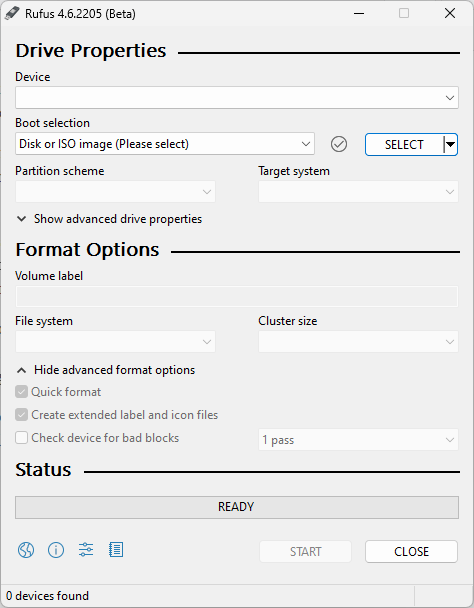
The developer of Rufus published a workaround recently. It contained a few lines of commands that would delete certain information from the Registry in Windows. This allowed administrators to install an in-place upgrade on machines running Windows 11 already.
Good to know: in-place upgrades upgrade an existing version of Windows, e.g., Windows 11 version 23H2, to a new version. The other option is a clean install. In-place upgrades ensure that users can keep their apps, files, and settings.
Rufus 4.6 integrates the lines of code. When you use Rufus to create a Windows 11 version 24H2 installation ISO or USB drive, it will automatically apply the fix to the image.
In other words: You no longer have to run the commands manually before you hit the setup.exe file to start the upgrade to the new version. You can download the latest beta from the developer website.
The bypass should work for most Windows 11 users right now who run PCs with compatibility problems. It won't help if your PC does not support SSE 4.2, as these are blocked by Microsoft in a separate way. It also won't help if your PC has other issues, e.g., another incompatibility or issue.
Rufus offers one of the best options to bypass compatibility checks during the installation of Windows 11 or upgrades from one Windows 11 version to another. There is a chance that Microsoft will block some or even all of the bypasses in the future, or to limit them significantly.
Do you run Windows 11 on unsupported hardware? If not, would you upgrade from an earlier version of Windows to Windows 11, if your PC does not meet the minimum requirements? Feel free to leave a comment down below.
RECOMMENDED NEWS

How to try Meta's AI image generator Imagine right now
Facebook and Instagram parent Meta just launched Imagine, an AI image generator. While Meta is a bi...
PSA: Raivo OTP for iOS was acquired by Mobime a few months ago
Raivo OTP, a popular authenticator app for iOS, has been acquired by a company called Mobime. The a...
Apple Vision Pro will be available in stores from February 2 in the U.S.
We finally have an official launch date for the Apple Vision Pro. The first spatial computer from t...

KeePassXC adds support for Passkeys, improves database import from Bitwarden and 1Password
KeePassXC has been updated to 2.7.7. The latest version of the open source password manager adds su...

There is a new PayPal Phishing Scam that you need to know about (using real PayPal emails)
Many PayPal users have seen their fair share of phishing emails ever since they signed up for the s...

Chrome 134 ships with security patches and new password change functionality
Google released a new stable version of its Chrome browser. This one brings Chrome to version 134 o...
Comments on "Rufus 4.6 bypasses Windows 11 24H2 compatibility checks automatically" :