How to send files between Windows and Android using Link to Windows
Remember the time when you had to connect your smartphones via a cable to your PCs to transfer files? This process was disliked by many users for a number for a number of reasons.
Now, with AirDrop, Phone Link, Link to Windows, Nearby Share and other wireless transfer solutions available in abundance, this is no longer necessary in many cases. Some users still prefer to transfer files via cables, as it does not require using an application for that.
Windows 10 and 11 users may use the Link to Windows app on their Android device to transfer files between Windows PCs and Android.
The details:
- Link to Windows is a free app by Microsoft for Android.
- The feature is supported on all recent Windows 10 and Windows 11 systems.
- File sharing is handled via the operating system's share feature.
You need to download and install the Link to Windows app on your Android device. Installation is straightforward. Once done, you are ready to link the Android device to a Windows PC in the following way.
Configure Link to Windows
The easiest way to get started is the following one:
- Right-click on a file and select the "Share" option from the context menu.
- Select "Phone Link" in the Share window.
- Pick Android on the Phone Link setup screen.
- Open the Link to Windows app on Android.
- Select "sign in to add computer".
- Activate "Sign in using the QR code on your PC".
- Scan the QR Code displayed on the Windows PC with the Android device.
- Select Continue.
- Type the code shown on the PC on your Android device.
- You may be asked to type the Microsoft account password.
- Allow or disallow access to certain features, such as SMS, phone calls, or contacts.
- Tap on Done to complete the process.
You may now use the Share menu at any time to send files from the connected Windows and Android devices. This works both ways.
Note that you need to repeat the process for any Windows PC or Android device that you want to connect as well.
Sharing requirements
The following requirements apply when sharing files between Windows devices and Android using Link to Windows:
- Both devices need to be online.
- This works only over Wi-Fi by default. On Android, you may enable "Use mobile data" to allow transfers to use mobile data.
- You need Phone Link version 1.24032.156.0 or later.
- You need the Link to Windows app on Android version 1.24032.518.0 or later.
Using Phone Link on PC
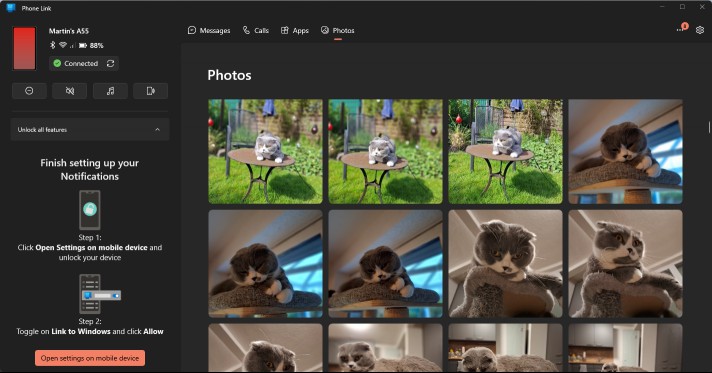
On PC, you may use the Phone Link app to control certain features on the Android device. What you can do depends on the permissions that you gave the Android app.
One thing that you can do, even if you disallowed all permissions, is to browse all photos of the Android device. You can use the feature to browse photos, save, share, or delete them.
The feature lacks a major option though: the ability to select and work with multiple photos at once. It is impracticable for downloading or deleting large numbers of photos. There is also no option to browse photos quickly or use jump to a specific time period using it.
This leaves the browsing and managing of newly captured photos as the feature's main purpose.
Tip: to transfer multiple files, use a file browser and the share feature of the device instead.
Closing Words
There you have it; another way to transfer files between Android and Windows. The advantage here is that this option is baked into Windows 10 and 11 already. While you still need to install the Link to Windows app for Android, the integration in Windows means that you have one less step to worry about.
Obviously, some Windows users may not like the Microsoft account requirement, but this is why it is optional. Other solutions, including Google's Nearby Share or open source solutions such as Snapdrop are also available.
Do you transfer files between your mobile devices and PCs frequently or even regularly? Which solution do you use for this? Feel free to write a comment down below.
RECOMMENDED NEWS

How to remove "Start back up" in Windows 11's File Explorer
Start back up may be displayed in File Explorer on Windows 11 if you open certain folders. The comm...
First look at Malwarebytes 5.0
It took Malwarebytes nearly five years to release the next iteration of its Malwarebytes security p...
Microsoft confirms it will not lower Windows 11 system requirements
Microsoft has confirmed that the Windows 11 system requirements are not changing. Windows 10 users ...
Find out if an USB device is fake with free ValiDrive app for Windows
Fake USB devices continue to be a problem. These devices claim to have higher storage capacities th...

AI-Powered Search Explodes in Popularity, Challenging Google’s Dominance
Artificial intelligence is reshaping the future of internet search, with recent data highlighting a...
Epic Games says Apple has blocked its Fortnite submission in the U.S. and EU App Stores
A week ago, Epic Games was celebrating its impending return to iOS. But now, it has announced that ...
Comments on "How to send files between Windows and Android using Link to Windows" :