Firefox update makes watching videos a more enjoyable experience
Mozilla is working on a new feature for its Firefox web browser: automatic picture-in-picture mode. It is currently available in Firefox Nightly 130 and could launch in Firefox Stable later this year.
Most modern web browsers support Picture-in-Picture mode. It allows users to display video content in a separate window on the system. Ideal for keeping an eye on the video while switching to another tab to do something else.
Up until now, activation of Picture-in-Picture mode was a manual affair. You had to click on the icon while hovering over the video to launch it.
Firefox would then display the video in its own window, and you could move it around, resize it, and control playback.

If you run the latest Firefox Nightly, currently at version 130, you may enable the newly added automatic Picture-in-Picture mode in the browser.
Once done, Firefox will launch a Picture-in-Picture window automatically when you play a video and switch away from its tab to another. Very handy to continue watching uninterrupted and without having to start the mode manually.
Here is how you enable it:
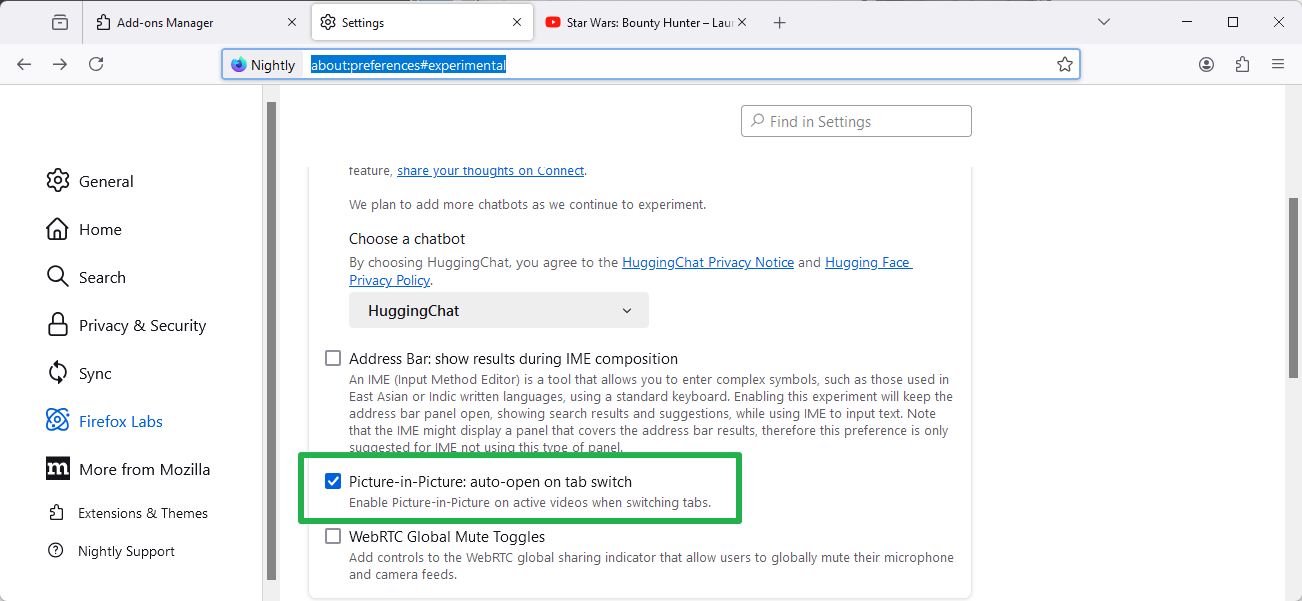
- Load about:preferences#experimental in the browser's address bar. You may also select Menu > Settings > Firefox Labs if you prefer to go there manually.
- Check the option Picture-in-Picture: auto-open on tab switch.
That is all to it. Firefox launches the mode automatically from that moment on whenever you switch to another tab.
Even better, when you go back to the tab of the video, Picture-in-Picture mode is ended automatically. Video playback resumes on the tab without any delays in that case.
The entire operation was fluent during tests.
Closing Words
Firefox users who play video content in the browser often may benefit from this. It does not really matter if you have used Picture-in-Picture mode before or not. It is an elegant solution that improves this special case for users of the browser.
It is too early to say whether this will be opt-in or opt-out. It is almost guaranteed however that Mozilla will implement a toggle to enable or disable the feature.
What about you? Do you use Picture-in-Picture mode? Would you use the automatic version if it would launch in your browser of choice? Feel free to leave a comment down below. (via Sören Hentzschel)
RECOMMENDED NEWS

How to watch age-restricted content on YouTube without signing in to your Google account
Do you use YouTube without signing in to your account? Have you ever come across an age-restricted ...

Dear Microsoft, why cannot I uninstall Microsoft Edge on Windows?
It is April 2024. The deadline for compliance with the Digital Markets Act was in March 2024. Still...

Enhance Your Safari Experience: Set ChatGPT as Default Search with New Extension
OpenAI has released an update to the ChatGPT app, introducing a Safari extension that allows users ...

Far Cry Multiplayer Game 'Project Maverick' Undergoes Development Reset
Ubisoft has reportedly restarted development on an unannounced live-service project set in the Far ...

WWDC25 to feature online sessions and in-person events at Apple Park
Apple has announced that its annual Worldwide Developers Conference (WWDC) will take place from Jun...

Over 100 Ryzen 7 9800X3D premature failures reported, mostly on ASRock motherboards.
The Ryzen 7 9800X3D, hailed as one of the best processors for gaming, is now drawing concern follow...
Comments on "Firefox update makes watching videos a more enjoyable experience" :