Microsoft is bringing Designer's AI editor to Windows 11's Photos app
Microsoft has announced that it is adding some new AI features to the Photos app on Windows 11. The options will be powered by Microsoft Designer's AI.
As you may be aware, the Microsoft Photos app already has a button that lets you edit an image in Designer online. Clicking on the button opens https://designer.microsoft.com in your web browser, with the image loaded and ready for editing. This is the experience that Microsoft is changing, the company wants to allow users to edit the images with Designer directly.
Microsoft Photos app gains AI-powered editing tools
The Photos app is gaining options to use Designer's AI to erase objects, blur the background, use generative erase to remove backgrounds or replace them, automatically crop images, etc. You can also use apply filters, or make adjustments to the brightness, contrast or saturation of the photos. Designer offers various options to add text or markup the images.
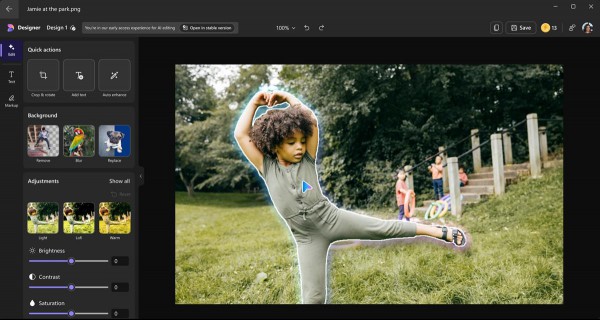
The AI features in the Windows 11 Photos app are available for users who have opted into the Windows Insider Program. Microsoft says that the AI experience is currently available for the following Windows display languages: English, Spanish, French, German, Italian, or Portuguese (Brazil). You will need the Photos app version number 2024.11070.12001.0 or above, and sign in to your Microsoft account to use Designer's AI features. Signing in to your account will allow the app to save your edits.
Note: I couldn't test the features, so I can't say how they work. (Images: via Microsoft)
The announcement also mentions that these advanced options in Microsoft Designer are coming soon to Edge. Microsoft has also introduced Designer for Copilot Pro subscribers, which will allowing users to create images and designs in Word or PowerPoint. Word users will soon be able to ask the AI to create a banner for their documents based on the document's contents.
Microsoft Designer is now available for Android and iOS
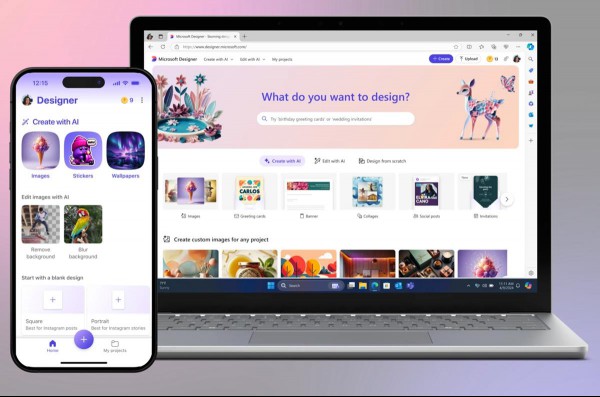
On a side note, Microsoft also announced the general availability of a standalone Microsoft Designer app. The app was in beta for a while, but is now available for users on Windows, iOS and Android devices. It is a free app which you can use to create generative images and designs on your mobile device, for instance, to create a birthday card.
Microsoft has been adding AI features to many apps on Windows 11 including Notepad, Paint, Snipping Tool, Edge browser, and in its Office apps. And of course, Windows 11 comes with the Copilot app. The Redmond company faced backlash from security experts when it unveiled Recall, a feature that captures the content of the screen once every 5 minutes, and makes the data searchable via user interactions with the AI. Microsoft had to react to the concerns quickly, and removed Recall from Copilot PCs. However, the Silicon Valley mogul has been working on adding features to Recall. It is possible that the controversial feature could be included as part of the upcoming Windows 11 24H2 Update.
AI has been slowly but steadily creeping into Windows apps, and this is rather concerning. Features like Spell Check are welcome, but why add these intrusive AI features to offline apps like Notepad, Paint or Photos? It would have been better if the company left the apps alone, and instead offered the AI experiences separately, or via the Copilot app.
RECOMMENDED NEWS

Windows Share to suggest Sharing Services in Windows 11
Windows Share will soon suggest sharing services in Windows 11 that are not installed. Microsoft in...

MSI unveils Intel-powered Windows gaming handheld Claw
MSI unveiled its first gaming handheld at CES 2024 today. The Intel Core Ultra-powered Claw A1M is ...

LibreOffice 24.2 released: enables automatic recovery of documents
The Document Foundation has released a new version of the open source Office application LibreOffic...
First look at Malwarebytes 5.0
It took Malwarebytes nearly five years to release the next iteration of its Malwarebytes security p...

VMware Workstation Pro 17 and Fusion Pro 13 are now free for personal use
Broadcom has announced that it is making its desktop hypervisor products free for home users. VMwar...
New Windows 11 Start Menu will merge pinned and recommended sections for easy access
Microsoft is revamping the Start Menu on Windows 11 to streamlining the user interface. It will mer...
Comments on "Microsoft is bringing Designer's AI editor to Windows 11's Photos app" :