Windows Share to suggest Sharing Services in Windows 11
Windows Share will soon suggest sharing services in Windows 11 that are not installed. Microsoft introduced the new feature in beta builds of Windows 11.
Windows Share is the native share feature of the Windows operating system. It works similarly to share services on mobile devices and other operating systems.
Select the share icon to get a list of options. On Windows, this includes a list of installed applications and connected services of the logged in user. Share may also suggest people to share to directly, but this depends on the list of contacts of the user.
Windows Share: suggested applications
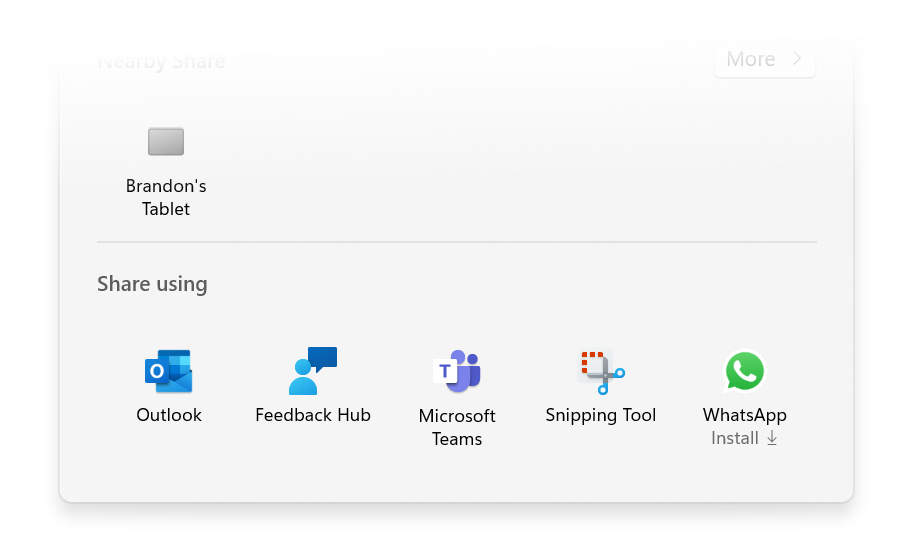
Windows Share will soon suggest other services and applications, even if these are not installed. Microsoft demonstrated the functionality recently with Whatsapp.
The share menu displayed four installed apps -- Outlook, Feedback Hub, Microsoft Teams and Snipping Tool -- and WhatsApp, which was not installed on the device. The "install" label underneath WhatsApp indicates this to the user.
Please note that visuals may change before the feature lands in stable versions of the Windows 11 operating system.
Microsoft describes the feature in the following way: "The Windows share window now supports sharing with WhatsApp under the “Share using” section. If you don’t have WhatsApp installed, you can choose to install it from Windows share window directly. Over time, we plan to try this experience out with other apps as well."
For now, the feature is limited to WhatsApp, a popular messaging application by Meta. WhatsApp is included in the Share menu if it is installed now, or its installation is suggested to users when they open the share menu.
Microsoft revealed no details on the integration. One likely assumption is that only Microsoft Store apps will be suggested to users. This limits potential sharing services to those available on the Microsoft Store. For now, only WhatsApp is suggested to test the functionality.
Closing Words
The share feature of Windows 11 is an optional tool. While it may speed up sharing for some users, others may prefer to share directly. This can be done by opening installed apps or websites manually to paste files or content into messages or mails.
RECOMMENDED NEWS

Its Groundhog Day at Microsoft! Vulnerability patched again
Remember the movie Groundhog Day? Bull Murray plays a rather self-centered weatherman who finds him...
Microsoft adds games that you can play without download to the Microsoft Store
Microsoft has just launched a new feature in the official Microsoft Store that allows users to play...

Google Chrome 123 launches with security fixes and Google Update changes on Windows
Google released a new stable version of its Chrome web browser for desktop operating systems and An...
Here are the best features in macOS Sequoia 15
Apple has released macOS Sequoia 15 just days after the release of iOS 18. Let's take a look at the...

Tor anonymity infiltrated: Law enforcement monitors servers successfully
Tor is an important service on the Internet when it comes to anonymity. It is free and can be used ...

Bungie reveals gameplay for Marathon, its first new game since Destiny 2
In an exciting reveal for fans of first-person shooters, Bungie has released a gameplay trailer for...
Comments on "Windows Share to suggest Sharing Services in Windows 11" :