Mozilla is investigating huge Telemetry performance issues in Firefox for Android
Mozilla, maker of the open source Firefox web browser, has launched an investigation to analyze the impact of Telemetry on the browser's performance on Android.
According to the initial report, Telemetry is causing huge overhead in Firefox for Android. This impacts the loading of websites, but also the browser's startup.
A test on CNN, for instance, concluded that Telemetry was adding 16.5 seconds of extra CPU time to the loading of the site.
Mozilla writes: "This means that device disks are getting hammered with writes on all occasions: page load, scrolling, video playback, startup. For example, we have observed hundreds of writes per second during scrolling (before bug 1898515 turned off the metric that was causing most of these updates) and ~32000 writes while loading cnn.com. On the Pixel 6 we were testing on, each write took around 0.5ms of CPU time, so that comes out to 16.5 seconds of extra CPU time for loading cnn.com."
On browser start, Firefox would use 40% more CPU time when compared to a version of Firefox with Telemetry set to off (35 seconds of CPU time compared to 25 seconds of CPU time).
This happens in Firefox Nightly as well as the release version of the web browser.
Mozilla discovered why Telemetry is adding the overhead to the browser. The core reasons are that writes to the Telemetry database are not grouped and that the entire database gets "serialized to disk" whenever it is updated.
In short, whenever new metrics come in, they are written to the database and the database is serialized to disk.
In other words, whenever Telemetry is updated, it is written to disk immediately. Since Telemetry is collected widely when enabled, it impacts the browser's startup, the loading and use of websites, media playback and other areas significantly.
While Mozilla is investigating the issue, Firefox users on Android may want to disable Telemetry in the browser to speed it up significantly.
How to turn off Telemetry in Firefox for Android
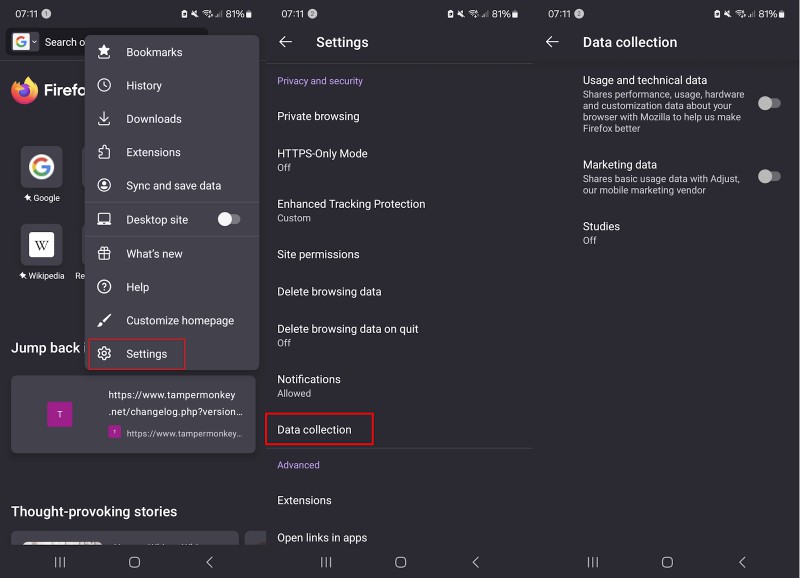
- Open the Firefox web browser on the Android device.
- Select Menu > Settings.
- Open Data collection under Privacy and security.
- Set Usage and technical data to Off.
- Set Marketing data to Off.
- Set Studies to Off.
- Firefox displays a prompt to restart the browser.
Recheck the menu to make sure that Telemetry is turned off. Note that Firefox is one of the few browsers that lets users turn off Telemetry comfortably in the settings.
Do you use Firefox on Android?
RECOMMENDED NEWS

Windows 11's Notepad is getting a character count on the status bar
Windows 11's Notepad is getting a couple of improvements. This includes a character count on the st...
FlyBy11: update introduces more Windows 11 installation options and plugins
My first review of the open source tool FlyBy11 is less than ten days old. The initial version coul...

RTX 5090 GPUs Are Failing After Latest Driver Update – What’s Going On?
NVIDIA’s latest RTX 5090 and RTX 5080 graphics cards have had a rough launch, and now, new reports ...

Microsoft is working on a new migration app for Windows
Windows 11 includes a rather weak backup tool that uses OneDrive to back up some files and preferen...

New Instagram Update Introduces Message Scheduling and In-Chat Music Features
Instagram has unveiled a series of enhancements to its Direct Messaging (DM) platform, aiming to en...

Microsoft extends security updates for Microsoft 365 on Windows 10
Microsoft is set to shelve Windows 10 on October 14, 2025, when it reaches its end of its support d...
Comments on "Mozilla is investigating huge Telemetry performance issues in Firefox for Android" :