Microsoft releases Windows 11 24H2 to the Release Preview channel
Microsoft has released the upcoming 2024 feature update for Windows 11 to the Release Preview channel. The update is available for testing ahead of its final release later this year.
The final version is expected to be released in September or October. It marks the start of Copilot+ PCs, which is a new PC class that is required to run most of the AI functions of the Windows 11 operating system. These PCs have new requirements, including a dedicated NPU chip.
The early release is noteworthy for a number of reasons:
- Windows 11 version 24H2 can't be installed on devices that have a processor that does not support SSE4.2. This is a new requirement that did not exist in earlier versions.
- AI features that require Copilot+ PCs are not integrated at this point. This means that features such as Recall are not available for testing.
- Cortana, WordPad and Tips are no longer available.
How to get Windows 11 version 24H2
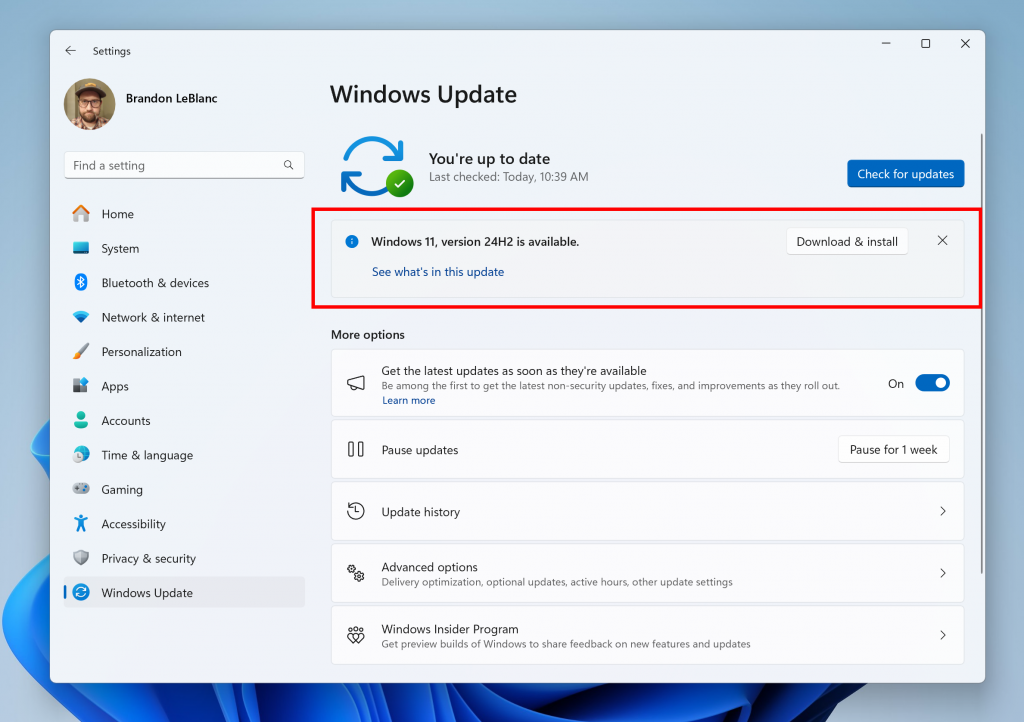
There are two main options to install Windows 11 24H2 on a device:
- Join the Release Preview channel on an existing Windows 11 device and run a manual check for updates.
- Download the ISO image and install it on a new / existing system.
The Release Preview option
- Open Settings > Windows Update > Windows Insider Program.
- Select Get Started.
- Follow the instructions.
- You need to link a Windows Insider account. You can link a Microsoft account, but need to register first on the official website.
- Select Release Preview when asked to pick a channel to join.
- Once done, open Windows Update in settings and check the get the latest updates as soon as they're available toggle.
- Now click on check for updates. Windows Update should return Windows 11, version 24H2 now, which you may download and install.
The ISO option
Note: you still need a Windows Insider account for this one.
Download the Windows 11 24H2 ISO from Microsoft's website. You can then burn it to an optical disc or use programs such as Rufus to copy it to a USB device.
If you use virtual machines, you can install this version of Windows 11 directly using the ISO image.
A quick overview of what is new in Windows 11 version 24H2
Microsoft highlights the following features:
- Sudo for Windows.
- HDR background support.
- Energy Saver.
- Rust in the Windows kernel.
- Support for Wi-Fi 7.
- Voice Clarity.
- Create 7-Zip and Tar archives in File Explorer.
- Bluetooth Low Energy Audio device improvements.
- Copilot will be pinned like an app to the taskbar. This allows users to resize, move, or snap the Copilot window.
- The apps Cortana, Tips, and WordPad are no longer available.
- All Copilot+ PC AI features will be released at a later point.
Closing Words
Interested testers can check out some of the functionality of Windows 11 24H2 by installing the Release Preview update. It includes core improvements, such as support for Wi-Fi 7 or integration of Rust in the Windows kernel.
The star of the show, at least from Microsoft's perspective, is AI, and it is notably absent from this release. Microsoft says that the features require Copilot+ PCs; first devices, like Microsoft's new Surface Pro and Surface Laptop, will become available in the coming weeks.
What about you? Are you looking forward to the new version of Windows 11?
RECOMMENDED NEWS

Winamp: new music platform and source code release
Winamp used to be a popular audio player for Windows. Things went quiet after its heyday and rights...
Latest Windows 11 update is reportedly causing freezes and lags for some users
If you have installed the latest batch of Windows 11 Updates and could boot fine into the system af...

U.S. DoJ could force Google to sell Chrome
The United States Department of Justice may force Google to sell Chrome. The news comes a few month...

Chrome 134 ships with security patches and new password change functionality
Google released a new stable version of its Chrome browser. This one brings Chrome to version 134 o...

YouTube may introduce customizable audio quality for Premium subscribers
YouTube is reportedly developing a new feature that will allow users to adjust the audio quality wh...
Microsoft extends security updates for Microsoft 365 on Windows 10
Microsoft is set to shelve Windows 10 on October 14, 2025, when it reaches its end of its support d...
Comments on "Microsoft releases Windows 11 24H2 to the Release Preview channel" :