Unactivated Windows 11 systems could soon block access to Microsoft Edge settings
Microsoft is testing new activation related restrictions on Windows 11 currently that affect the system's integrated Microsoft Edge browser.
Windows 11 can be installed without a product key. This leaves the operating system in an unactivated state. While the system works fine for the most part, it does display reminders and a watermark, and does prevent access to certain personalization options, such as setting wallpapers (there is a way around that).
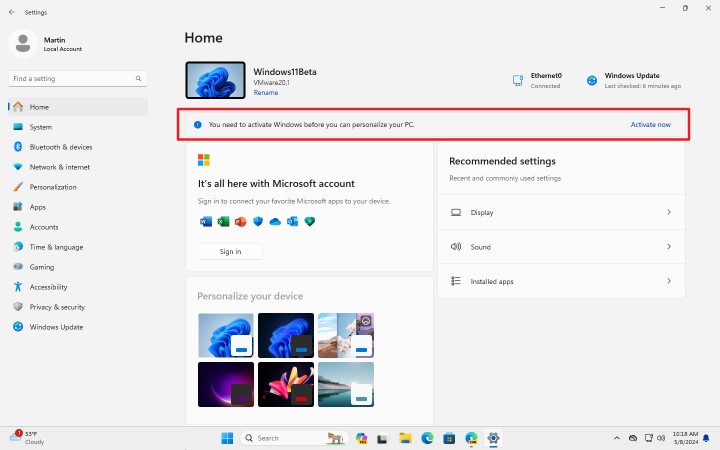
Windows 11 works fine in most areas. You can install programs, use the Microsoft Store, update the operating system, or make administrative changes.
Soon, Microsoft may block access to some Microsoft Edge settings however.
Microsoft Edge Settings blocked
Discovered by our colleagues over at Windows Latest, and verified by us, Microsoft is testing several activation related flags in recent Edge Canary builds. These lock access to settings and may display notifications that Windows 11 is not activated.
The easiest way to test this is to install Windows 11 without providing a product key in a virtual machine. The system is not activated in this case, unless you sign-in with a Microsoft account that has a linked digital Windows-key associated with it.
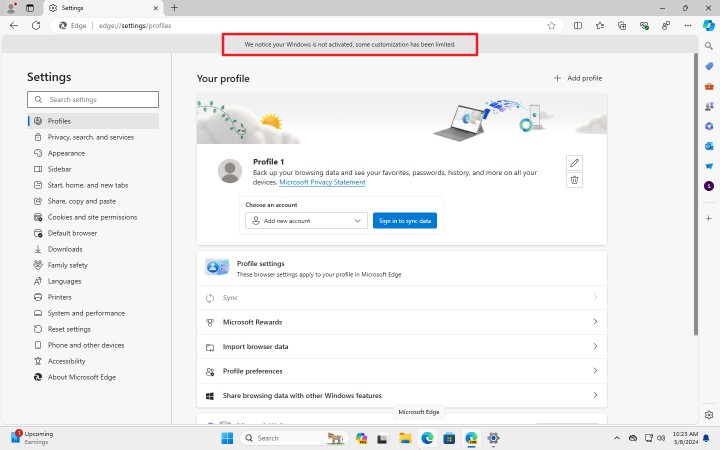
Once enabled, Edge displays the following message in Settings on systems that are not activated: "We notice your Windows is not activated, some customization has been limited".
This notice is shown on every page of the Settings. Not many settings are blocked at the time of writing. The "When Edge starts" preference is inaccessible, which means that you can't change anymore how Edge opens.
In other words, it is not possible to switch from Edge's new tab page to another start page or resting the previous session.
The test is a work in progress. It is possible that Microsoft is going to add more restrictions to the settings of the browser in future updates.
Why is Microsoft testing the change?
There is no official statement from Microsoft about the change or the motivation behind it. While it may impact consumers, the likelier target seems to be organizations.
After all, it takes just a few seconds to install another browser on Windows 11:
- Open Start.
- Type cmd and press the Enter-key.
- Type winget install Mozilla Firefox and press the Enter-key again.
You can replace Mozilla Firefox with the name of another browser, e.g., Google Chrome, Brave, Vivaldi, or Opera.
For organizations, implications may be more severe. Employees may be required to use Edge. When they see the activation message, they might ask their coworkers or superiors about it, or, in case of disgruntled employees, report the incident.
Closing Words
It remains to be seen if Microsoft implements the change in Microsoft Edge stable. If it does, it might even drive some home users to using a different browser.
What is your take on the feature?
RECOMMENDED NEWS
Microsoft releases the April 2024 Security Updates for Windows
The April 2024 security updates for Windows are now available. Microsoft released the security upda...

Popular Windows XP privacy tool is making a comeback
If you have lived through the Windows XP era of computing, you may have used a program called XP-An...
Print AI: HP injects AI into its printers
HP jumped on the AI bandwagon today when it announced Print AI for its printers. Is it a ploy to ex...
OpenAI launches Sora, an AI tool that generates videos from text
OpenAI has announced a new AI model that can create videos from text. Say hello to Sora. Sora...
Microsoft suggests to trade your PC or recycle it in "end of support for Windows 10" emails
Microsoft is sending out emails to customers who still run the Windows 10 operating system to infor...
Finally! Microsoft is making AI useful in Windows by introducing AI agents
When Microsoft announced the first batch of AI features in Windows last year, it did not introduce ...
Comments on "Unactivated Windows 11 systems could soon block access to Microsoft Edge settings" :