Microsoft configures Windows Copilot to launch automatically on certain setups
Soon, Windows users who start their PCs may be greeted by Windows Copilot's interface when the system loads the desktop. Microsoft released a new build to the Dev channel that tests the feature on certain setups.
Announced yesterday on the Windows Insider Blog, the new feature configures Copilot to launch automatically on Windows start. Microsoft limits the test to devices with widescreen monitors at the time.
Here is Microsoft's full announcement: "We are trying out opening Copilot automatically when Windows starts on widescreen devices with some Windows Insiders in the Dev Channel. This can be managed via Settings > Personalization > Copilot. Note that this is rolling out so not all Insiders in the Dev Channel will see this right away."
Good news is that users may disable the autostart of Windows Copilot on their devices. Bad news is that the feature is enabled by default and needs to be deactivated manually by users. Even worse is the fact that you can't control the behavior via Task Manager > Startup apps, but need to find the new Copilot preference in Settings to do so.
Microsoft continues its habit of -- almost -- hiding certain preferences on Windows by introducing new locations for them instead of using traditional ones.
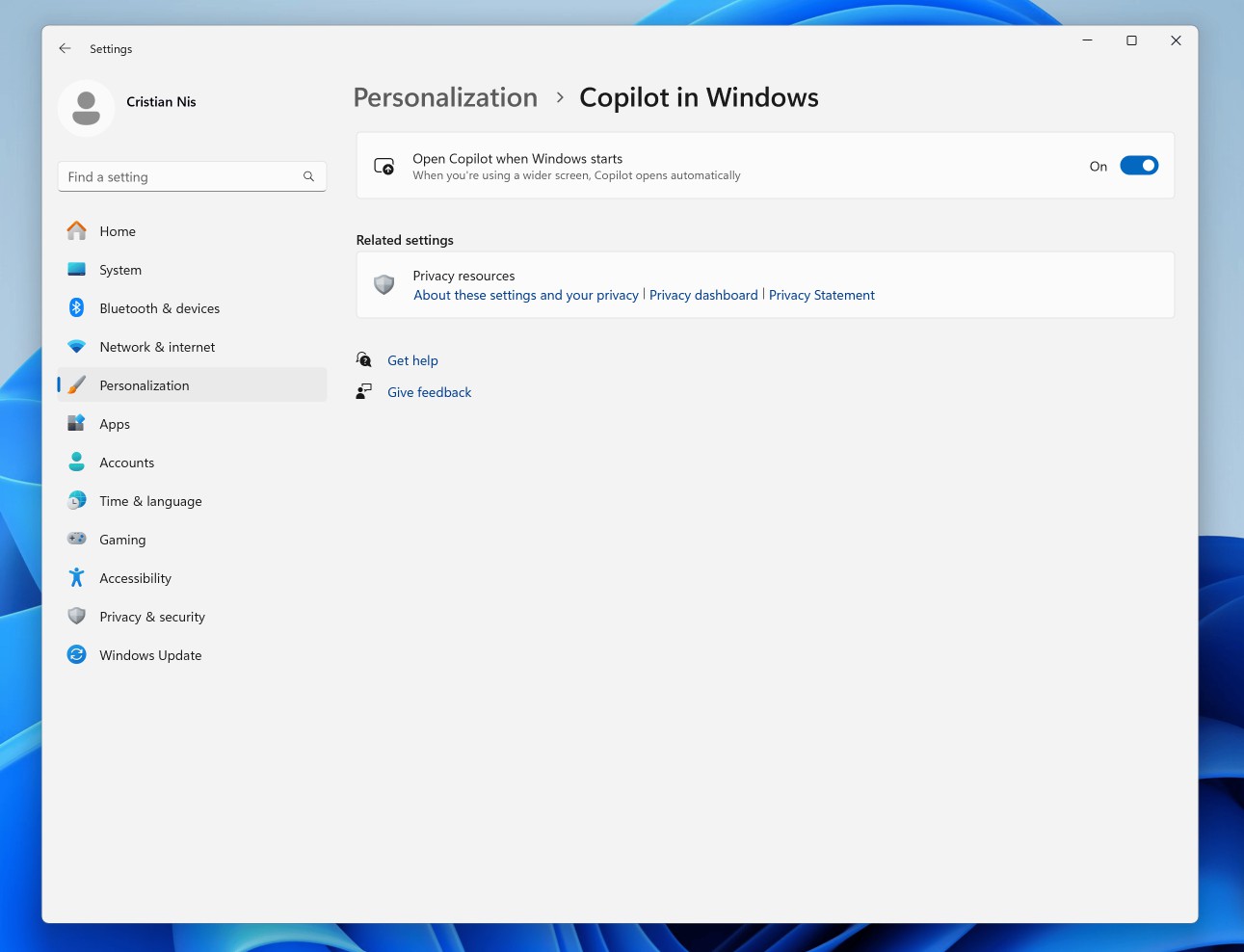
To toggle the functionality, open Start > Settings and go to Personalization > Copilot in Windows. There you find "Open Copilot when Windows starts". Just toggle the feature to off to disable it.
Note that you may also disable Copilot in Windows completely, which will also block it from auto starting with Windows.
Microsoft does not explain why it decided to integrate the autostart of Copilot in Windows. The change will get more eyes on the AI tool, which Microsoft is pushing into many of its products at the time. Even Notepad is getting an AI component and there seems to be no end to AI integration announcements anytime soon.
Copilot in Windows is still not the tool that many Windows users might hope it would be. It is basically an integrated version of Bing Chat with a tiny amount of Windows controls sprinkled on top. Communication lags, because it requires Internet connectivity and communication with Microsoft servers. It could become better over time, especially if Microsoft manages to integrate a locally-run component.
The new Windows build introduces support for USB 80 Gbps as well, which prepares the operating system for the "first major version update of the USB4 standard" according to Microsoft.
Now You: have you disabled Copilot on your devices or do you use the feature?
RECOMMENDED NEWS

Microsoft Family Safety is blocking Google Chrome, but there's a workaround
If you are having trouble with Google Chrome crashing or not opening, Microsoft Family Safety may b...
You may now hide embarrassing games on Steam
Steam users may hide embarrassing games on Steam soon from prying eyes of friends by setting their ...

More details emerge about the Justice Department's sweeping antitrust case against Apple
A few days ago, we discussed the tough challenges that Apple could face in the U.S. and the EU. Tod...
Windows 10 Start Menu will soon display ads for Microsoft 365
Windows 10 will reach end of support next year. But, it is gaining a feature, one that you didn't a...

How to rebuild the icon cache in Windows 11
Windows 11 uses the icon cache extensively to display icons of applications and other elements of t...

Microsoft shuts down Skype, users can migrate their data to Teams Free
Microsoft has officially retired Skype today. This decision was announced at the end of February. ...
Comments on "Microsoft configures Windows Copilot to launch automatically on certain setups" :