Microsoft is adding Cowriter AI to Notepad
Microsoft is working on adding AI to the plain text editor Notepad on Windows. Called Cowriter, it is adding AI-based text manipulation features to the text editor.
Windows enthusiast PhantomOcean3 posted a screenshot of Cowriter in Notepad on Twitter. It shows the Cowriter menu in Notepad.
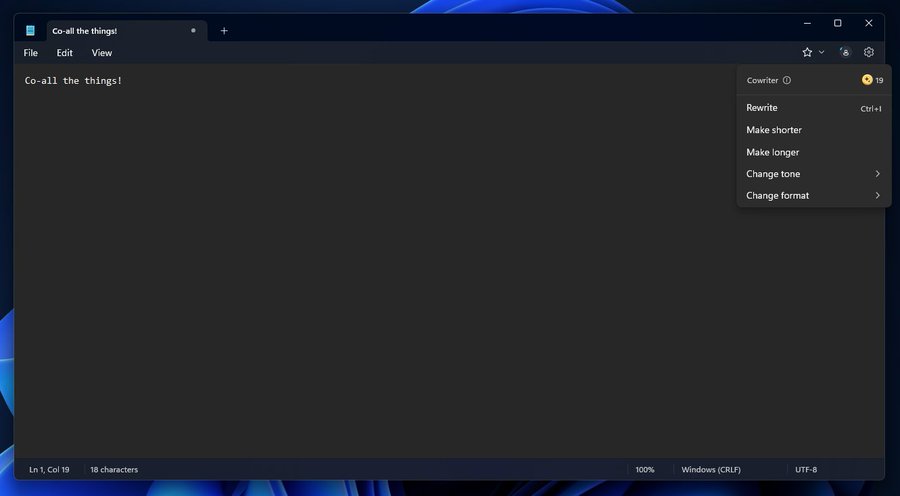
The menu lists available credits and several options to manipulate text in Notepad. These are, at the time of writing:
- Rewrite -- this commands the AI to rewrite the selected text.
- Make shorter -- asks the AI to reduce the size of the text.
- Make longer -- opposite of make shorter.
- Change tone -- to change the tone of the text, e.g., from casual to professional.
- Change format -- to change the format, e.g., from paragraph to blog post.
If this reminds you of something, you are not mistaken. If you check the Compose option that Microsoft baked into its Edge browser last year, you will notice that it offers similar functionality.
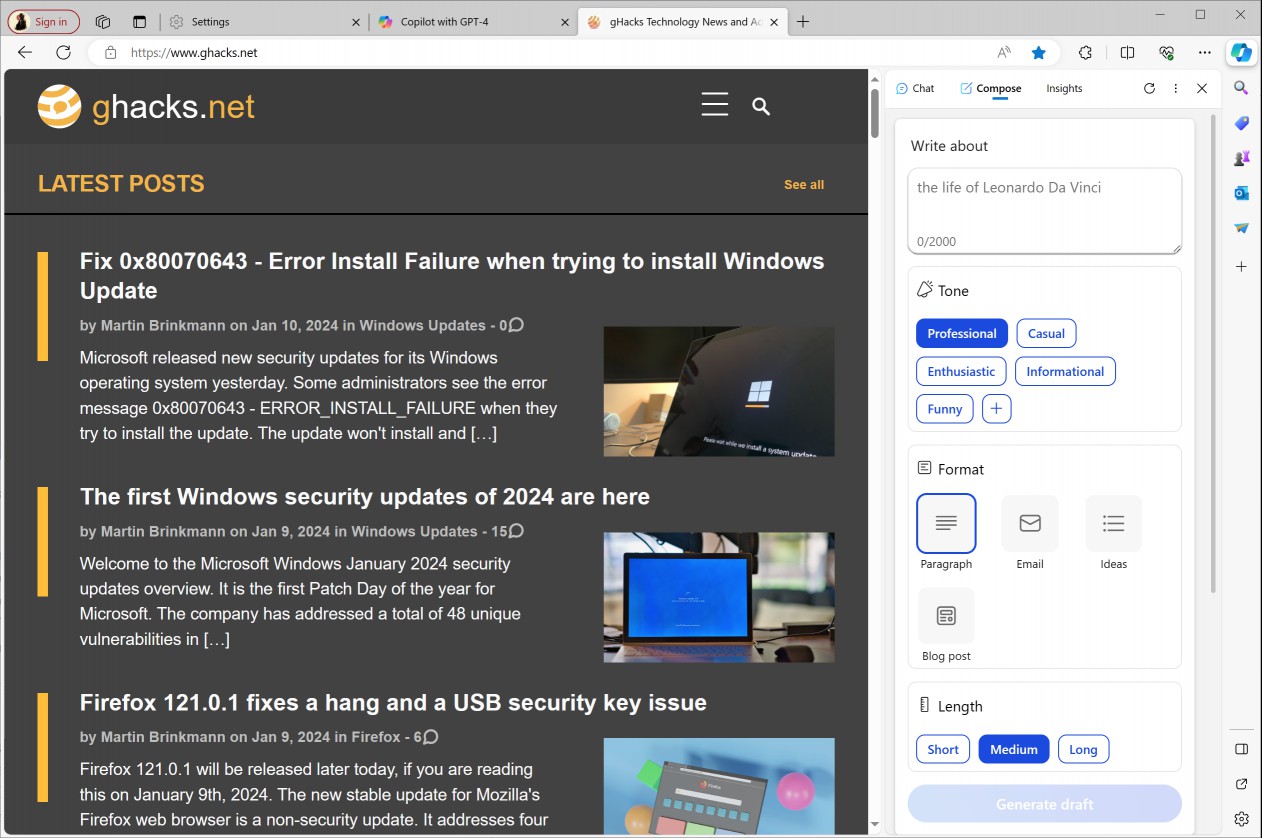
There you find options to type or paste text, select a tone, format and length, and let the AI do the rest. There are two main differences at the time of writing. First, that the Compose option in Edge does not require credits, and second, that you ask the AI to write about something. This can be a rewrite of text that you add, but it can also be something different.
The integration of Cowriter in Notepad confirms that Microsoft is not done yet adding AI to its products. It even renamed Microsoft Edge for Android and iOS to Microsoft Edge: AI Browser recently.
The integration of Cowriter in Notepad is still in development. It may launch later this year along with other changes that introduce even more AI into the life of computer users.
Closing Words
2024 will show if there is substance to the changes. Will users use all the AI options in Microsoft products, or will they ignore them for the most part.
Notepad is used by many as a fast text editor, to quickly read plain text files or compose text quickly. Microsoft updated Notepad in recent years several times, after neglecting it for decades. The plain text editor supports tabs now to open multiple documents in a single window, a character count, a dark mode, and even an auto save feature.
Now You: would you use Cowriter in Notepad?
RECOMMENDED NEWS

The Windows December 2023 security updates fix a 0-day vulnerability
Microsoft released security updates for all supported Windows operating systems and other company p...

MSEdgeRedirect's Europe Mode sets your Windows region to Europe
In the coming months, Windows users from many European countries will be allowed to remove Microsof...
Microsoft releases the November 2024 security updates for Windows
Microsoft released the November 2024 security updates for all supported client and server versions ...

Microsoft confirms Auto HDR bug in Windows 11 and blocks updates as a consequence
Windows 11, version 24H2 has not been out for long, but its number of issues is already longer than...

Microsoft 365 prompts urge users to back up files to OneDrive
Microsoft is set to roll out new prompts in its Office apps including Word, PowerPoint, and Excel, ...

YouTube may introduce customizable audio quality for Premium subscribers
YouTube is reportedly developing a new feature that will allow users to adjust the audio quality wh...
Comments on "Microsoft is adding Cowriter AI to Notepad" :