MSEdgeRedirect's Europe Mode sets your Windows region to Europe
In the coming months, Windows users from many European countries will be allowed to remove Microsoft Edge, Bing Search and other features of the operating system natively.
Microsoft announced the change in November 2023 as a response to the European Digital Markets Act. While that is great for users from these European countries, it does leave Windows users from other regions behind.
While there are workarounds, namely changing the region of the system to one of the supported European countries, it does require some system edits.
The latest version of the open source tool MSEdgeRedirect changes that. It includes a new mode, Europe Mode, which makes the changes for you.
Here is how you use it.
First thing you need to do is head over to the project's GitHub repository and download the latest version of MSEdgeRedirect. Download the executable file. Please note that Microsoft Edge may state that this file is not safe, which is not true, at least not for anything but the browser itself.
Double-click on the downloaded file. Windows may throw a SmartScreen warning, which is also nothing to worry about in this case. You should see the following screen after accepting the application's terms.
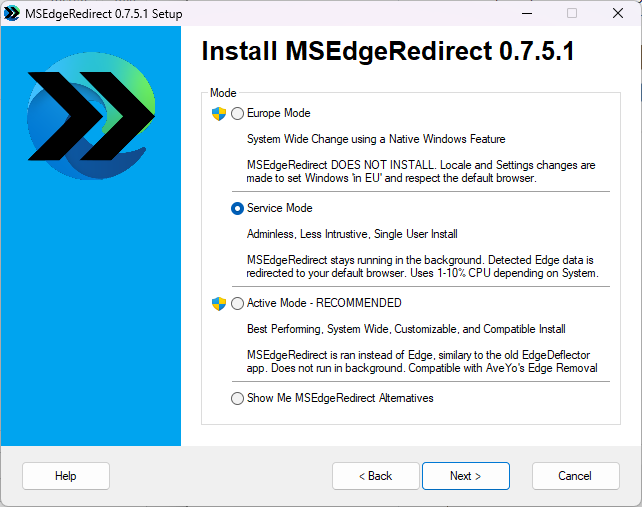
Switch to Europe Mode and select Next. This displays the Configure European Country settings.
The application displays the active values on the left side. Use the "EEA Country" menu to select the desired European Country. Note that this won't affect other settings, including keyboard layout or language of the operating system.
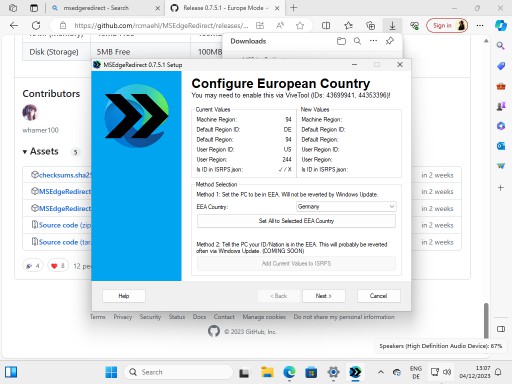
Once you have selected the country, activate the "set all to selected EEA country" button. This changes all settings accordingly.
All that is left to do now is to restart the system. Once you have done that, you may uninstall Microsoft Edge from Settings > Apps > Installed Apps just like any other app you may encounter.
The developer of MSEdgeRedirect lists the following supported features once Europe Mode is active:
- Edge is uninstallable
- User can disable web search
- Narrator scripting extensions are enabled
- File Explorer Search is third party extensible
- Third party search providers show in search
- Third party search highlight content in search zero input
- Third parties can customize the Taskbar Gleam
Note that you may make the change even if you live in Europe. This allows you to get the functionality early.
Tip: make sure you install another browser prior to removing Edge from the system.
Closing Words
Windows users who want to remove Microsoft Edge and other features from their operating system can do so now, even if they don't live in one of the supported European countries.
Now You: would you remove Edge if it was supported natively?
RECOMMENDED NEWS
Microsoft makes Windows 10 ESU free for some users, but there is a catch
The Windows 10 operating system reaches its end of life in a few months. Microsoft won't release an...

Chrome extensions may slow down browsing significantly
Extensions are one of the greatest strengths of web browsers. They allow users to extend functional...

The end of Patreon? Google is implementing micro-payments into Chrome
Google is working on integrating what it calls Web Monetization functionality in its Chrome web bro...

UnattendedWinstall: open source tool bypasses Windows installation restrictions and removes bloatware
Windows users have quite a few tools at their disposal that let them customize Windows installation...

WinScript: open-source tool to configure and debloat Windows
Plenty of tools exist that give users more control over the Windows operating system. Applications ...

Snapchat+ Platinum members gain access to exclusive AI video lenses
Snapchat has unveiled a new suite of AI-powered video lenses, exclusively available to its Platinum...
Comments on "MSEdgeRedirect's Europe Mode sets your Windows region to Europe" :