Microsoft is reportedly auto-installing the HP Smart app on Windows 10 and 11 PCs
Windows 10 and 11 ship with several apps that you may not want. One more app has reportedly joined the list of bloatware, the HP Smart app.
A report by Windows Latest says that they noticed a new app called HP Smart had been added to the Start Menu on their Windows 10 laptop. However, it didn't end there, the author discovered that the app had also been auto-installed on their Virtual Machine that was running on Windows 11.
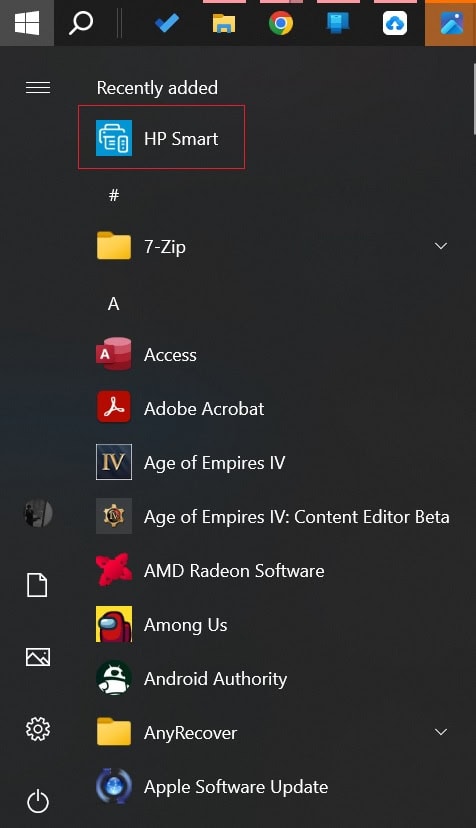
Image courtesy: Windows Latest
What is interesting about this scenario is the fact that the report says that the app got auto installed even when no HP products were connected to the PC. Some users on reddit have reported that they too have experienced a similar problem. The HP Smart app is being installed via the Microsoft Store. This meant that the app wouldn't be listed under the Programs and Features section in the Control Panel.
Remember when it thought it was a good idea to install the Google Docs app Offline extension in Microsoft Edge automatically? I mean, this is not even a first-party app, why go to these lengths to promote them? Well, I suppose we shouldn't be surprised by these shenanigans. Still, the difference between an auto installation of a browser extension and a desktop app is huge.
The comments from users indicate they were worried whether the app was a virus. Who can blame them for thinking that, when an app that you have never used, and probably never even heard of, randomly gets installed on your computer, it does seem similar to malware-like behavior. One user claimed that they found a folder under Program Files called HPPrintScanDoctor, and a service named HPPrintScanDoctorService.exe that was running on Windows start-up using a scheduled task.
It is worth mentioning that HP Smart is an official app from the electronics giant, the app is available for Windows, macOS, Android and iOS, and lets you print, scan, and share files using your HP Printer. That should be a little comforting for users. So if you see the app listed on your Start Menu, don't panic and reset your PC or do a clean installation of Windows. It's just Microsoft being Microsoft.
Unfortunately, there is no explanation about why the HP Smart app was being auto-installed on Windows 10 and Windows 11. But there is some good news, Microsoft has released a statement to Windows Latest, to say that it has acknowledged the issue, and told them it will share more details about it soon.
My guess is that it was probably a "technical error" that pushed the app to all PCs, instead of only those that were connected to an HP accessory. Actually, I'm not really a fan of that either. It is never a good idea to get driver updates from Microsoft, they can cause various issues, and they have done so in the past.
You could easily end up with a buggy driver, it happened to me a few years ago with an NVIDIA Graphics Card Driver that caused massive performance issues and lags, and I had to roll back to a previous version manually to fix the problems. And don't use those junk driver updater and snake oil system utilities software either, always get the latest drivers from the hardware vendor's website.
As for how to get rid of the HP Smart app, you can just right-click on it and select uninstall, and hope that it doesn't get reinstalled the next time you boot your PC.
RECOMMENDED NEWS

Your Google Maps Location History will soon be stored on your devices
Google is making an important change to the Timeline feature of Google Maps. The feature is powered...

AdGuard Temp Mail: new temporary email service launched
AdGuard, best known for its content blocking solutions, has launched a temporary email service. Tem...
Microsoft 365 price increased after introduction of Copilot
Microsoft has increased the prices of Microsoft 365 subscriptions. But you get access to Copilot wi...
Netflix prices are increasing again
Netflix is once again increasing the monthly prices of its subscription plans across multiple count...
Apple TV+ Now Available on Android Devices with Exclusive Content and Free Trial
Apple has officially launched its Apple TV+ streaming app for Android devices, marking a major expa...
Microsoft increases prices for Xbox consoles, accessories and new game releases
Microsoft has announced a significant price increase for its Xbox consoles and accessories effectiv...
Comments on "Microsoft is reportedly auto-installing the HP Smart app on Windows 10 and 11 PCs" :