Microsoft says KB5034440 and KB5034441 updates won't be offered to PCs that meet these conditions
Remember the 0x80070643 error that affected the KB5034440 and the KB5034441 Updates. Well, Microsoft has provided more details about the requirements for installing the update.
To recap, Microsoft released the KB5034440 Update for Windows 10 and Windows 11 in January 2024. The update was meant to patch a security vulnerability in Windows Recovery Environment (WinRE), which a hacker could exploit to bypass the BitLocker Encryption. This was fixed in KB5034236, which added the Safe OS Dynamic Update. But the KB5034440/41 Updates were buggy, and would fail to install. Several users tried to install them manually, but were unsuccessful. It always resulted in a 0x80070643 error that said Error Install Failure, which the Redmond company acknowledged as a known issue. The problem was that the recovery partition did not have sufficient disk space, so the update would fail to install. This meant that it could not
The issue remained unsolved for a long time, and Microsoft officially confirmed in May that it would not be able to fix the problem through a Windows Update. This meant that users had to patch their computers manually.
Microsoft had provided some instructions about how to patch the WinRE recovery partition. There are two ways to do this, you can add an update package to it manually on Windows 10 and Windows 11. Or, you can extend the Windows RE partition (increase the size) by running a script given by Microsoft. Once you have extended the partition's size, open the Settings app, and navigate to Windows Update > Check for updates, for the KB5034440 and KB5034441 updates to show up.
This is why KB5034440 and KB5034441 updates won't be offered to you
According to some updated documents on Microsoft's website, the KB5034440 and KB5034441 Windows updates will not show up in the list of available updates if your computer meets any of these conditions. The WinRE recovery partition requires 250 MB of free space, if your system does not have sufficient free space, you won't get the update.
If your computer does not have a WinRE recovery partition, there is nothing to be patched. You can check whether your system has WinRE by running this command in an elevated command prompt: reagentc /info. The terminal will return an output as follows, and if you see Windows RE Status: Enabled, you will need to update it manually.
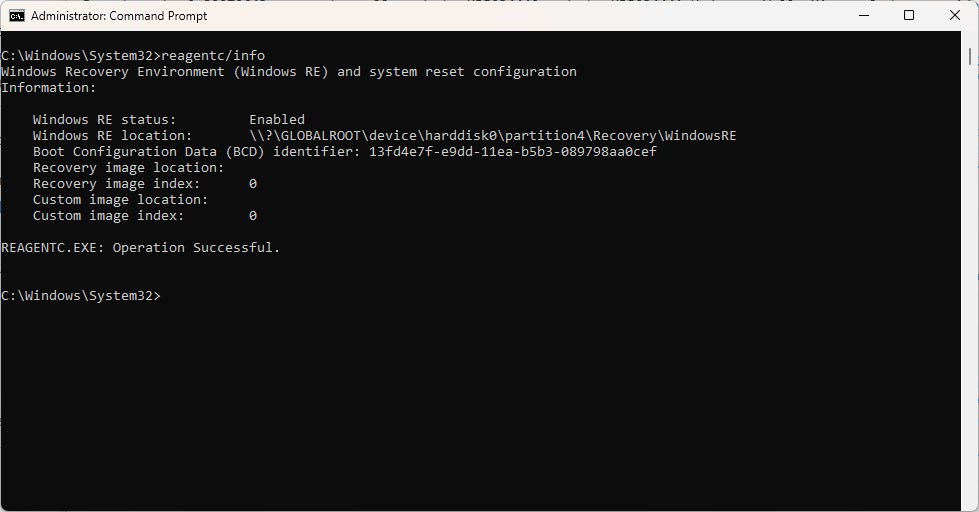
Your PC will not be eligible for the updates if you had updated the WinRE recovery partition manually, because it is already up-to-date, so you won't see the update in the Settings. Press Windows + R and type regedit to open the Windows Registry Editor.
Navigate to the following location: HKEY_LOCAL_MACHINE\SOFTWARE\Microsoft\Windows NT\CurrentVersion, to check the WinREVersion registry value. If the WinRE image version is 10.0.19041.3920 or higher, your PC has been patched already.
The above requirements apply to the following operating systems: Windows 10 Home and Pro, version 21H2 Windows 10 Enterprise and Education, version 21H2 Windows 10 IoT Enterprise, version 21H2 Windows 10 Home and Pro, version 22H2 Windows 10 Enterprise Multi-Session, version 22H2 Windows 10 Enterprise and Education, version 22H2 Windows 10 IoT Enterprise, version 22H2.
On a side note, Microsoft has confirmed that Windows 11 version 21H2 and 22H2 will reach end of support in October.
RECOMMENDED NEWS

Windows 11's Notepad is getting a character count on the status bar
Windows 11's Notepad is getting a couple of improvements. This includes a character count on the st...

Windows Share to suggest Sharing Services in Windows 11
Windows Share will soon suggest sharing services in Windows 11 that are not installed. Microsoft in...

Microsoft confirms 0x80070643 error during Windows update installation
Some Windows users who tried to install the January 2024 security updates for their devices receive...
Update for Windows Update adds end-of-support actions
With last month's scheduled security update for Windows 10 and 11 came another update that Microsof...

Anthropic's claude AI to introduce two-way voice conversations
Anthropic's AI chatbot, Claude, is poised to undergo significant enhancements, introducing two-way ...

Firefox 138 launches with improved profile management and security updates
Firefox 138 is the latest version of Mozilla's open source browser. It will be released later today...
Comments on "Microsoft says KB5034440 and KB5034441 updates won't be offered to PCs that meet these conditions" :