How to enable Tab Previews in Firefox
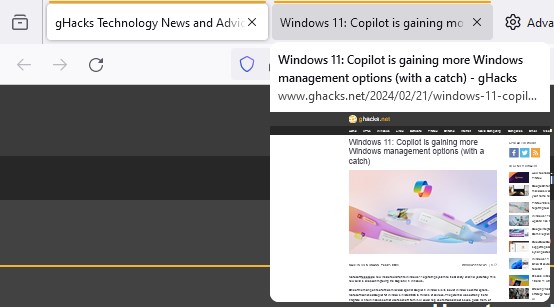
Mozilla released Firefox 123 a few days ago, and it comes with a new feature. The browser now supports Tab Previews, but you can't access it directly from the Settings.
The feature is quite similar to Tab Preview that is available in Google Chrome, Microsoft Edge, Vivaldi, Opera, and Brave Browser. When you hover the mouse over a tab, the browser displays a thumbnail of the web page. This can be useful if you want to view a tab's contents without actually switching between tabs.
Mozilla introduced the feature in the nightly version of Firefox earlier this month, before adding support for it in the stable version. Though Tab Previews are available in the latest version of Firefox, the feature is not enabled by default, likely because some bugs are being sorted out. There is no option that you can toggle from the browser's settings. Instead, you will need to make a change in the advanced configuration. Here's how you can do it.
How to enable Tab Previews in Firefox
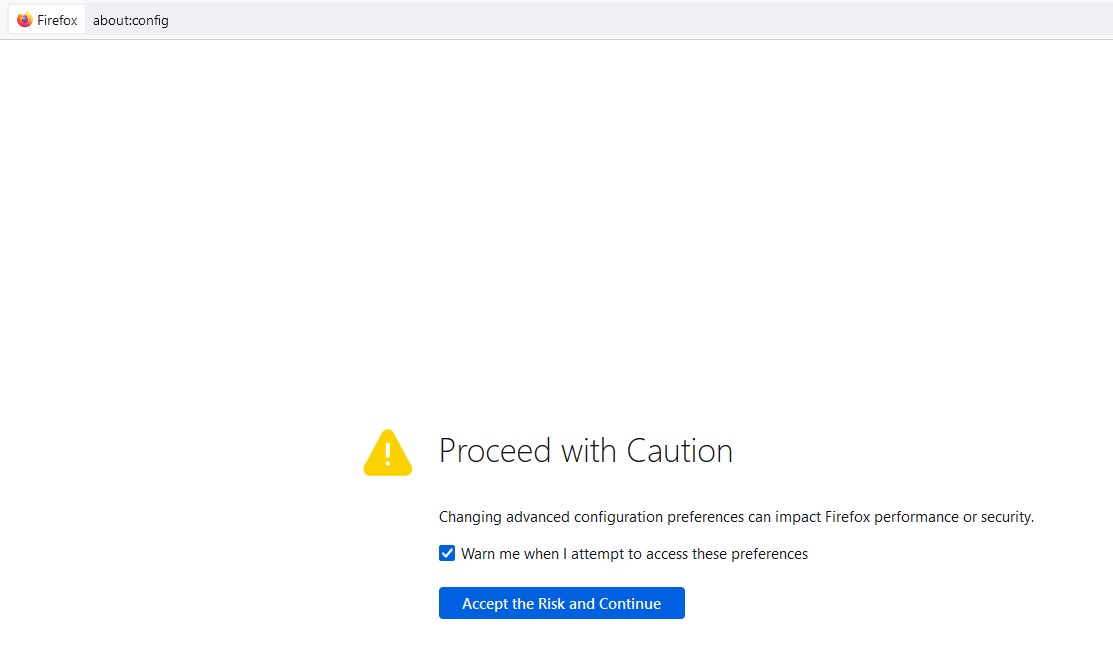
1. Open about:config.
2. Click on Accept the Risk and Continue.
3. Paste the following text in the search bar.
browser.tabs.hoverPreview.enabled
browser.tabs.cardPreview.enabled
4. Select Boolean if the Flag does not exist.
5. Double-click on it to change it to true.
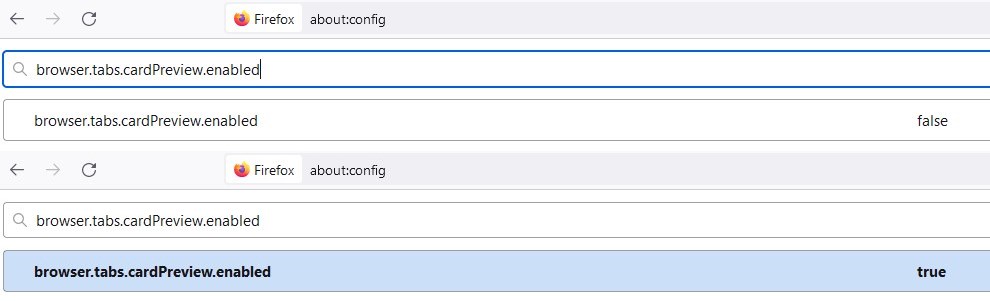
Note: browser.tabs.cardPreview.showThumbnails must also be set to true.
That's it. You don't even have to restart the browser after making the changes. Time to test if it works. Open a couple of tabs, and mouse over them, and Firefox will display the Tab Preview. It is worth mentioning that the feature only works with active tabs, i.e. tabs that are currently loaded. So tabs that are unloaded (upon browser restart) or those that have been snoozed by extensions like Auto Tab Discard will not display a Tab Preview, you will need to click on them to make them active.
Now, if you feel that the Tab Previews are displayed slowly, there is another setting that you can change. Look for the following setting: browser.tabs.cardPreview.delayMs
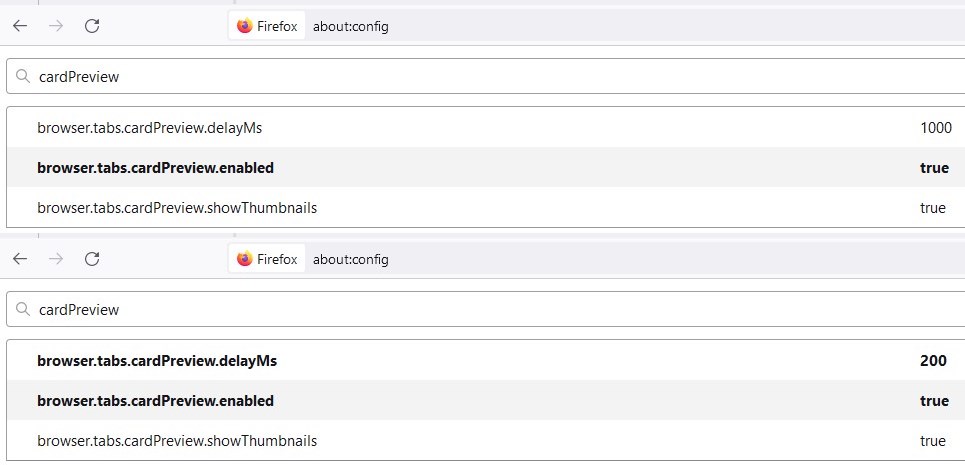
It is set to 1000ms (1 second) by default, so the Tab Previews are displayed 1 second after you move the cursor over a tab. Set the value to 500ms or lower to reduce the delay. You can set it to 200ms to make the previews appear instantly.
Firefox 123 also ships with a new Web Compatibility Reporting Tool. It is also a hidden setting. Follow the same steps given above, and search for extensions.webcompat-reporter.enabled. Set its value to True, to activate it. To use the tool, visit any website, and click on Firefox's Menu > Help, and you should see an option that says "Report site issue".
Want to view thumbnails of multiple tabs at once? You can use the Panorama Tab Groups extension to see the previews, and also to organize your tabs in groups. That said, native support for Tab Preview is a welcome move, it's always better than using an add-on that could become outdated and might eventually end up unsupported or broken.
Hopefully, Mozilla will add support for Tab Groups and Vertical Tabs to Firefox, which users have been requesting for a long time.
Do you like Firefox's Tab Preview feature?
RECOMMENDED NEWS

Monopoly Go Bows and Bandits event is here!
The Monopoly GO craze is growing like an avalanche with a brand-new event. The timeless board game ...
Firefox 121.0.1 fixes a hang and a USB security key issue
Firefox 121.0.1 will be released later today, if you are reading this on January 9th, 2024. The new...

Microsoft confirms 0x80070643 error during Windows update installation
Some Windows users who tried to install the January 2024 security updates for their devices receive...

Brave Browser: strict fingerprinting protection will be removed
Brave Software announced that it will remove the strict fingerprinting option from its Brave Browse...
How to block account changes on iPhone using Screen Time
Apple recently added a feature called Stolen Device Protection to iOS 17.3, which helps prevent thi...
Lost Files on Mac External Drive? Here’s How to Recover Them
Data loss from Mac external drives is a common and often frustrating experience. Whether it’s due t...
Comments on "How to enable Tab Previews in Firefox" :